
A conditional block is a section of an email that only appears when it's actually relevant to the guest receiving it. A guest who already signed their waiver won't see a "Sign your waiver" button; a guest who paid in full won't get a balance-due nudge. One template adapts to each guest, so you stop sending reminders that don't apply.
In this article
Conditional blocks change only what shows inside a template — not when it sends. Your emails still go out on the same triggers as before. Conditions are an email feature; they don't apply to SMS.
How conditional blocks work
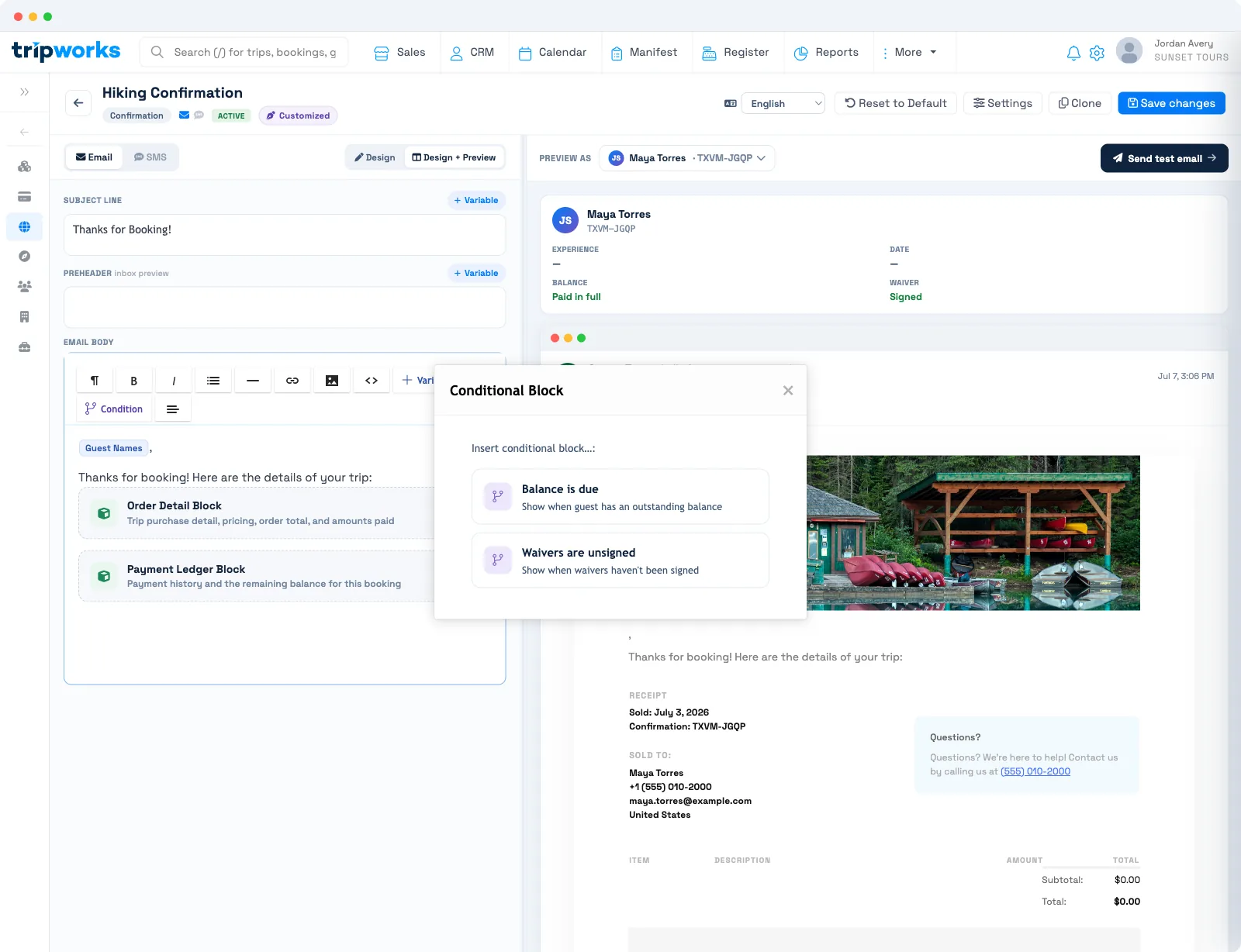
In the Studio, you wrap a piece of content in a condition using the Condition button on the toolbar. That content appears only when the condition is true for the guest receiving the email. Everything you leave outside a conditional block always shows, exactly as it does now.
The condition is evaluated at send time, against that guest's current state. So whether a balance is owed or a waiver is signed is checked the moment the email goes out — the content is always accurate to that guest right then, not to whatever was true when you wrote the template.
The conditions you can use include:
- Balance is due — show the content only when the guest still owes money.
- Waivers are unsigned — show the content only when the guest hasn't signed their waiver yet.
A guest who has already paid, or already signed, won't see the wrapped block at all.
Wrap content in a condition
- Open the email template you want to edit in the Message Templates Studio.
- Select the content you want to make conditional — a button, a paragraph, or a whole section.
- On the toolbar, select Condition and choose the condition that fits, such as Balance is due or Waivers are unsigned.
The Studio saves your change on its own. From then on, that section only renders for guests who match the condition.
Example: one reminder for every guest
You send a pre-trip reminder. Without conditions, every guest sees both a "Pay now" button and a "Sign your waiver" button — even guests who already paid and signed.
Wrap the "Pay now" button in Balance is due and the "Sign your waiver" button in Waivers are unsigned. Now a guest who paid in full and signed sees a clean reminder with neither button; a guest who still owes and hasn't signed sees both; and a guest who paid but hasn't signed sees only the waiver prompt. One template, every situation, with no separate versions to maintain.
Frequently asked questions
When is a condition evaluated?
At send time, against the guest's current state. If the balance is paid or the waiver is signed by the moment the email goes out, the wrapped block won't appear for that guest.
Do conditional blocks change when my emails send?
No. Conditions only show or hide content inside a template. Your emails still send on exactly the same triggers as before.
What happens to content I don't wrap in a condition?
It always shows. Only the content you place inside a conditional block is affected — the rest of the template is unchanged for every guest.
Can I use conditions in SMS messages?
No. Conditional blocks are an email feature. SMS versions send their full content to every recipient.
Related
Built for attractions, tours & activities
One email that fits every guest
See how attractions, tours, and activities send emails that adapt to each guest's balance and waiver status on TripWorks. Book a demo and make the switch.