
A marketing source records how a guest heard about you — Google, a referral, a billboard, TikTok, a magazine ad. It's one of the most useful pieces of marketing data you can collect, because it tells you which activity actually turns into bookings. It's different from the booking method, and keeping the two straight is the key to reading your numbers correctly.
In this article
Booking method vs. marketing source
These describe two different things about a booking, and TripWorks tracks both:
- Booking method = the channel a booking came through. This is a fixed, built-in list: online (e-commerce), walk-up, reseller/OTA, phone, email, chat, and TripWorks' AI phone/chat/call agents. You don't configure these — every booking is automatically tagged with the channel it was made through.
- Marketing source = how the guest heard about you. This is a list you define — Google, Facebook, TripAdvisor, "Billboard on Route 1," "Returning guest," "Hotel concierge." It answers the marketing question the method can't.
The difference matters: a booking's method might be walk-up, while its source is "Billboard on Route 1." Same booking, two very different insights — one about how they booked, one about why they came.
Set up your marketing sources
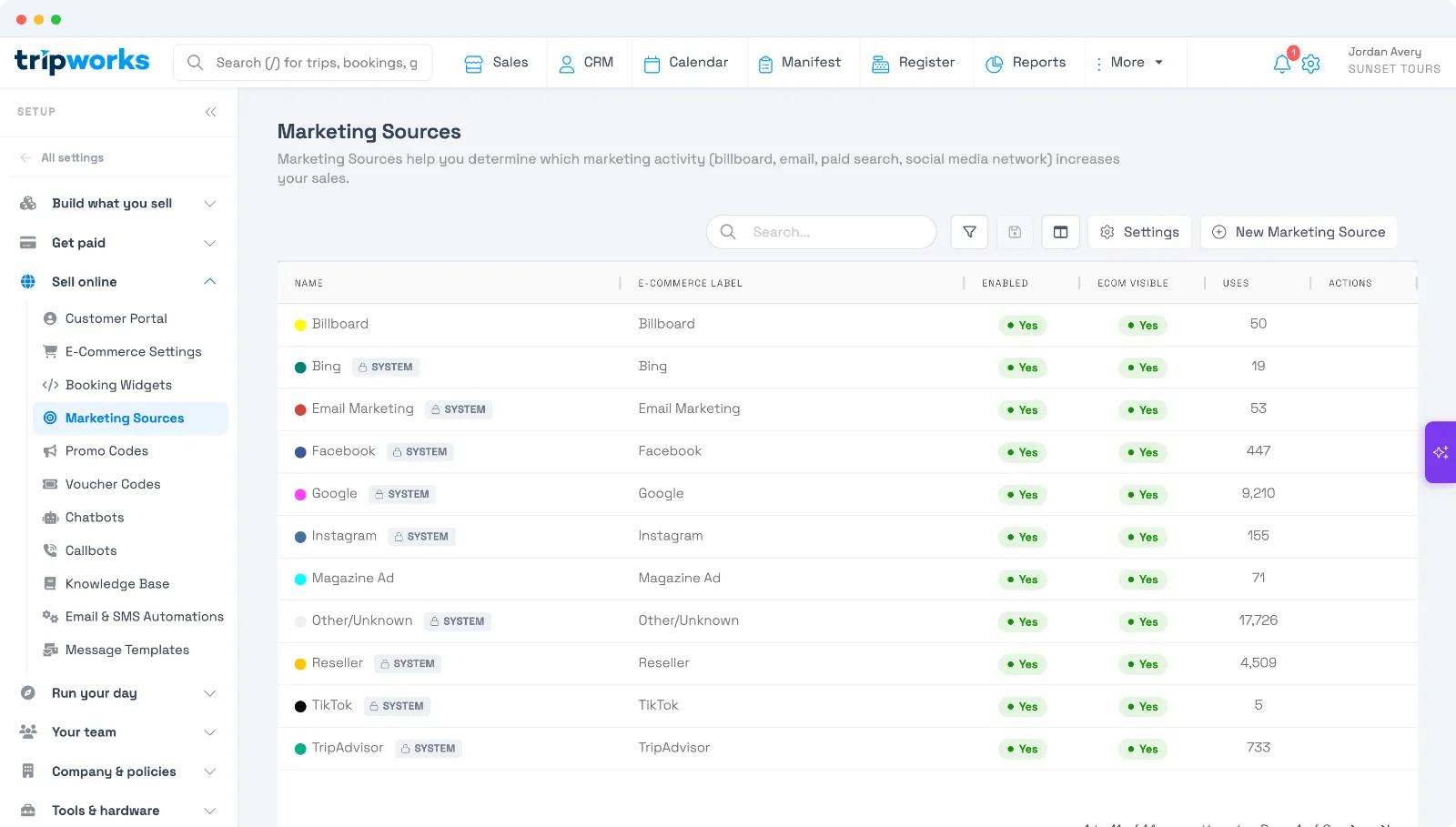
Configure them under Setup Marketing Sources. TripWorks starts you with a set of built-in system sources (Google, Facebook, Bing, Instagram, TikTok, TripAdvisor, Email Marketing, Reseller, ChatGPT, Gemini, Perplexity, Copilot, and Other/Unknown), and you can add your own:
- Select New Marketing Source and give it a clear name.
- Set the e-commerce label guests see, and a color to make it easy to spot in reports.
- Choose whether it's enabled and ecom visible (whether it appears in the online checkout prompt).
The list shows a Uses count for each source, so you can see at a glance which are actually driving bookings. Add as many as you like, rename them any time, and disable ones you no longer use.
Ask guests directly: "How did you hear about us?"
TripWorks can show a "How did you hear about us?" prompt so guests pick a source themselves. Turn it on where you want it, under Setup Marketing Sources Settings:
- Online checkout — shoppers choose from the sources you've marked ecom-visible.
- Offline bookings — your team picks a source when they create a booking by phone or at the desk.
Only the sources you mark ecom-visible appear in the online dropdown, so you control exactly what guests see.
The clever part: automatic detection online
For online bookings, TripWorks usually doesn't need to ask — it figures out the source automatically, and it's smart about it. When someone lands on your site, TripWorks quietly records where they came from in a first-party cookie that lasts 60 days: the landing URL (including any UTM tags and ad click IDs), the referring site, and basic visit info. When that visitor books — even days later — TripWorks assigns the right source:
-
Ad clicks win first. A Google click (
gclid) maps to your Google source, a Microsoft/Bing click to Bing, a Facebook click (fbclid) to Facebook. -
Then UTM tags. A recognized
utm_source— google, facebook, bing, yelp, tripadvisor, youtube, tiktok, email, or an AI assistant like chatgpt, gemini, perplexity, and copilot — maps to your matching source. - Then the referrer. If the visit came from TikTok without tags, it's attributed to TikTok.
- Otherwise, Unknown. If there's nothing to go on, the booking is tagged Other/Unknown rather than guessing.
It's first-touch by default — TripWorks remembers the first way a guest found you — with one sensible exception: if they later return by clicking a fresh ad, that newer ad click takes credit (the same "last click" model ad platforms use). Along the way it also captures the campaign, ad group, keyword, and device behind the booking, so your attribution is genuinely useful, not just "web."
A few things worth knowing:
- You keep control of the labels. Auto-detection matches on the channel behind the scenes, but the name guests and reports see is whatever you called the source — so a source that catches Facebook traffic can still be labeled "Social."
- Custom sources are for people, not robots. Sources you invent (like "Billboard on Route 1") are for the checkout prompt and your team to choose manually — they're not auto-matched from web traffic.
- Staff bookings don't inherit a visitor's history. A logged-in team member's booking defaults to Unknown unless they pick a source.
For the full detail of everything TripWorks captures and how it's stored, see Marketing attribution & UTM tracking.
Where you see it
Each booking carries its source, and your reports let you slice bookings and revenue by source — so you can finally answer "which channels are worth the spend?" with real numbers.
Frequently asked questions
What's the difference between a booking method and a marketing source?
The method is the channel a booking came through (online, walk-up, reseller, phone…) and is built in. The marketing source is how the guest heard about you (Google, referral, a sign…) and is a list you define.
Do I have to ask guests how they heard about us?
Not for online bookings — TripWorks auto-detects the source from ad clicks, UTM tags, and referrers. You can still turn on a "How did you hear about us?" prompt for online and/or offline bookings if you want guests or staff to choose.
Why are some online bookings tagged "Other/Unknown"?
When there's no ad click, UTM tag, or recognizable referrer to attribute a visit to — for example, someone typing your URL directly — TripWorks tags it Other/Unknown rather than guessing. Staff-created bookings also default to Unknown.
Can I rename a source without breaking auto-detection?
Yes. Auto-detection matches on the channel behind the scenes, so you can rename and recolor a source freely — for instance, labeling your Facebook-matched source "Social."
Does TripWorks recognize bookings that come from ChatGPT or other AI assistants?
Yes. When a guest asks an AI assistant — ChatGPT, Gemini, Perplexity, or Copilot — to help find something to do and clicks through to your booking page, TripWorks tags the resulting booking with the matching source instead of Other/Unknown.
These clicks work a little differently from a typical referral. Browsers and AI assistants often don't pass along a normal referring-site signal on this kind of click, so TripWorks leans primarily on the tracking tag the assistant includes in the link itself — for example, a link ChatGPT shares typically carries utm_source=chatgpt.com — rather than the referrer. As long as that tag survives the click, which it does for a normal click-through, the booking gets attributed correctly.
Why did some of my past "Other/Unknown" bookings change to show an AI assistant as the source?
Before TripWorks recognized AI assistants as marketing sources, a booking referred from one of them had no matching source to attribute to, so it landed in Other/Unknown. Once support for ChatGPT, Gemini, Perplexity, and Copilot was added, past Other/Unknown bookings that were actually referred by one of these assistants were reviewed and reassigned to the correct source — so your historical reporting reflects this channel too, not just bookings going forward.
Related
Built for attractions, tours & activities
Know what's actually driving bookings
See how attractions, tours, and activities track marketing on TripWorks. Book a demo and make the switch.