
The most efficient TripWorks integration asks for less and reacts to events instead of checking for them. Requests to the REST API are counted for each key and for your account as a whole, so an integration that fetches only what it needs, and is told when something changes, stays fast and well inside its allowance. This article covers the habits that make that easy. The exact limits for your account are always on the Limits tab of the REST API card.
In this article
Learn how to manage permission groups
In this article
- Why webhooks beat polling for most integrations
- How to ask for less with filters, sorting, and cursor paging
- What to cache, and why a key per integration helps
- How to respond when TripWorks asks you to slow down
- How to read the Limits tab
Why does efficiency matter?
Every request counts toward the allowance for the key that made it and toward the allowance for the account. Reads and writes are counted separately, over a minute and over an hour. An integration that asks for a lot of data it doesn't need, or asks again and again to see whether anything changed, uses its allowance quickly and slows itself down. An integration that asks for exactly what it needs rarely notices the limits at all.
Should you poll or use webhooks?
Use webhooks whenever you can. Polling means asking TripWorks, over and over, whether anything has changed. Almost every one of those requests comes back with nothing new. A webhook flips this: TripWorks sends your server a message the moment something happens, such as a trip being reserved, a payment landing, or a waiver being signed.
A common pattern combines the two:
- Subscribe to the events you care about. See Set up webhooks for the list of events and what each message contains.
- When a message arrives, read the details you need from it. Trip messages carry the trip, its activities, and its guests.
- If you need something the message doesn't include, make one targeted REST API request for that record.
Reserve polling for jobs where no event exists, and run them on a schedule that matches how often the data really changes, not as fast as the code can loop.
How do you ask for less?
Filter the request so TripWorks returns only the records you need, and sort and page the results sensibly.
- Filter by date or status. Add a condition instead of fetching everything and filtering in your code. For example, reserved trips from a date forward:
GET /rest/trips?trip_status=reserved&sale_date[gte]=YYYY-MM-DD&sort=-sale_date
-
Filter to one thing. Look up a single guest with
GET /rest/customers?email[contains]=jordaninstead of listing every customer. -
Set
per_pageto a size your code can handle, so you aren't pulling more rows than you will use in one go. -
Follow the cursor. Lists page with an opaque cursor. Send the
meta.next_cursorfrom one response ascursoron the next, and stop whenmeta.has_moreisfalse. Don't start a list from the beginning each time. - Remember where you stopped. For a recurring job, store the date or id you last processed and filter forward from it, instead of re-reading everything.
What should you cache?
Some data barely changes and gets read constantly. Fetch it once, keep it in your own system, and refresh it on a schedule or when a webhook tells you it changed. Good candidates are locations, your activities and their ticket types, trip sources, waiver types, and country lists. Requests you don't make can't be rate limited.
Why use a separate key for each integration?
Limits are tracked per key, and the Limits tab lists each key on its own. When each integration has its own key, a busy integration can't use up the allowance of the others, and you can see at a glance which one is working hard. It also makes the Logs tab easier to read, because the Credential column tells you which integration made each request. See How API keys and access work.
How do you respond when TripWorks asks you to slow down?
When a key goes over an allowance, TripWorks rejects the request with a 429 status and the error code too_many_requests instead of processing it. Build your code to expect this:
- Stop sending requests for a short pause, then retry the one that was rejected.
- If it is rejected again, wait longer each time, and add a small random delay so several workers don't all retry together.
- Resume your normal pace once a request succeeds.
- If it keeps happening, look for a loop or a polling job that runs too often, and move that work to webhooks or a slower schedule.
How do you read the Limits tab?
Open Setup Integrations, select the REST API card, then select Limits.
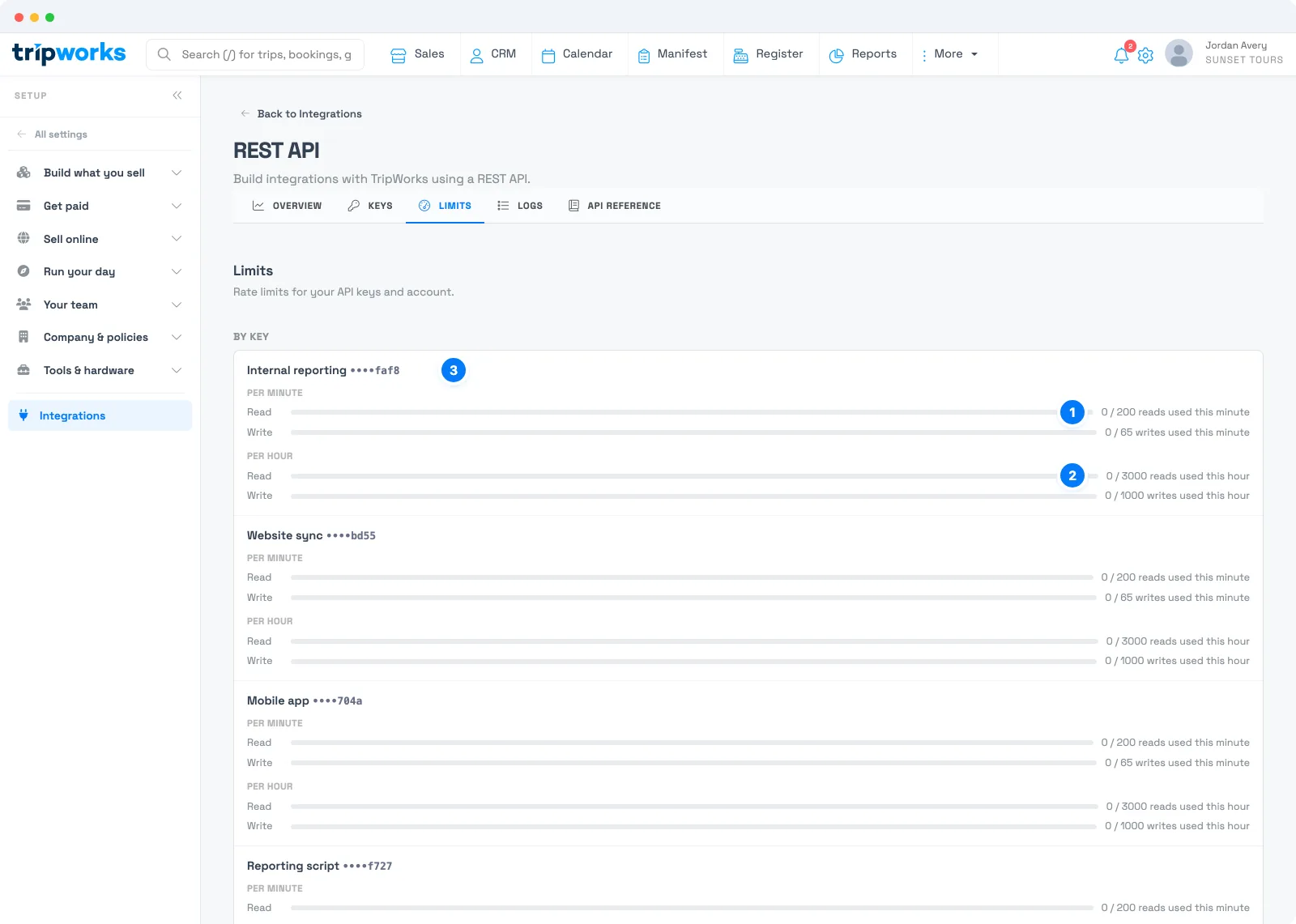
- Reads this minute. The bar fills as the key uses its read allowance for the current minute. Writes have their own bar underneath.
- Reads this hour. The same view over an hour, with reads and writes shown separately.
- The key. Each key is listed with its name and its last four characters, so you can see which integration is using its allowance.
Check this tab when an integration feels slow or starts getting 429 responses. A bar that is nearly full for one key points straight at the integration to fix.
Examples
- Replace a polling job with a webhook. Instead of listing trips every minute to find new reservations, subscribe to the reservation event and read each trip as the message arrives.
-
Sync only what changed. Store the date of the last trip you processed, and filter
sale_date[gte]from there on the next run. - Look up one guest, not all guests. Filter customers by email, rather than paging through the whole list.
- Cache your activities. Fetch your activities once a day, and refresh sooner only when a webhook says something changed.
- Give the website its own key. A separate key for your booking page means a busy reporting script can't slow it down.
-
Back off politely. On a
429, wait, retry with a growing delay, and carry on.
Frequently asked questions
What happens if my integration goes over a limit?
TripWorks rejects the request with a 429 status and the error code too_many_requests, and doesn't process it. Your code should pause, retry with a growing delay, and carry on. The rejected requests appear in the Logs tab with the status 429 Rate limited.
Where can I see my current limits?
On the Limits tab of the REST API card. It lists each key with its usage this minute and this hour, for reads and writes, so the numbers you see there are always your current ones.
Is it better to use webhooks or poll the REST API?
Webhooks, for anything that reacts to an event. They tell you the moment something happens, so you don't spend requests asking whether anything changed. Use the REST API to read details you need and to make changes. Use polling only when no event exists for what you need.
How do I fetch only new records?
Filter by a date that moves forward, such as sale_date[gte] or created_at[gte], and store the last value you processed so the next run starts there. Combine it with a sort so you read the newest first, and page with the cursor until meta.has_more is false.
Does each integration need its own API key?
It's strongly recommended. Usage is tracked per key, so separate keys stop one busy integration from using up the allowance of another. They also make the Logs tab easy to read, because each request shows which key made it.
What should I cache?
Data that changes rarely but is read often: locations, activities and their ticket types, trip sources, waiver types, and country lists. Keep a copy in your own system, refresh it on a schedule, and refresh sooner when a webhook tells you something changed.
Why are my requests slow even though I'm not hitting a limit?
Large unfiltered lists take longer to build and return. Add filters so TripWorks returns only the records you need, lower per_page if your code struggles with big responses, and follow the cursor instead of starting each list from the beginning.
Related
- Get started with the REST API
- Set up webhooks
- How API keys and access work
- Does TripWorks have an API?
Built for attractions, tours & activities
Build on top of your booking data
See how attractions, tours, and activities connect their booking data to the tools they already use with TripWorks. Book a demo and make the switch.