
This is the complete list of third-party tools TripWorks connects to natively. Each one is set up under Setup Integrations, except OTAs and resellers, which you add under Resellers. If a tool isn't on this page, TripWorks doesn't have a native integration with it today. In that case, the section Don't see the tool you use? covers the ways you can still connect it.
In this article
Learn how to manage permission groups
Payments
- Stripe: connects your bank account so TripWorks can take card payments and pay you out. Stripe is the payment processor for every TripWorks account; there's no option to use a different card processor.
- Klarna: lets guests pay over time (buy now, pay later) on USD checkouts. It runs on top of your Stripe connection, so there's nothing extra to sign up for.
Marketing and ad tracking
- Google Ads: reports completed bookings to Google Ads as conversions.
- Google Analytics (GA4): sends bookings to GA4 as purchase events, with revenue and item detail.
- Facebook (Meta) Ads: reports bookings to Meta as purchase conversions.
- TikTok Ads: fires a purchase event in TikTok on every completed booking.
- Cometly: feeds booking conversion data back to your ad platforms for attribution.
- Ambassador: reports completed bookings to your Ambassador referral campaign so referrers get credit.
- Google Business Profile: adds your TripWorks booking link to your Google Business Profile so people who find you on Search and Maps can book.
Email and customer data
- Mailchimp: adds new TripWorks customers to the Mailchimp audience you choose.
- People Data Labs: fills in extra details on customer profiles, such as country and social profile links, using your People Data Labs key.
Phone, calls, and texting
- CallRail, RingCentral, Dialpad, OpenPhone, Vonage, Kixie, and CallTrackingMetrics: send each call's recording and details into TripWorks, where it's transcribed, analyzed, and linked to the guest's booking. These seven are the only phone providers TripWorks connects to.
- Twilio: sends your guest text messages (SMS) from your own Twilio phone number. Twilio is for text messages only. It doesn't connect phone calls or call tracking.
TripWorks also has its own AI Callbot, which answers your phone without any outside provider. See Set up your AI Callbot.
Calendar
- Calendar feeds (iCal): builds links that put your bookings, pickups and add-ons on Google Calendar, Apple Calendar, or Outlook, for your whole business or just one guide, resource or pickup spot.
Guest photos and rental protection
- Fotaflo: links guest photos and videos to the right reservation so you can deliver them to guests.
- PicThrive: syncs guest photos and videos to the right reservation for delivery and sales.
- VQuip: syncs your reservations to VQuip for rental protection, including cancellations and reschedules.
Automation, AI, and developer tools
- Zapier: sends TripWorks events (new trips, payments, signed waivers, new leads, and more) to thousands of other apps with no code.
- Webhooks: posts booking, payment, waiver, note, payout, and customer events as JSON to any web address you choose, in real time.
- REST API: lets a developer's software read and update your TripWorks data with an API key.
- AI Assistants: lets Claude, ChatGPT, or Gemini work with your account in plain English, limited to your own permissions.
The REST API and AI Assistants cards appear once they're turned on for your account. If you don't see them, contact TripWorks support.
OTAs and resellers
OTA and reseller connections live under Resellers, not Setup → Integrations. TripWorks works as your channel manager: you add an OTA as a reseller and its bookings arrive in your calendar as normal trips.
- Supported OTAs: the full list of OTAs you can add by name, including Viator, GetYourGuide, Expedia, Klook, and Tiqets.
- Connect Viator to TripWorks: the extra setup Viator needs.
- How OTA and reseller bookings connect: how bookings, availability, and cancellations flow.
- Connect as a reseller or OTA with OCTO: for resellers that want to connect to you over the OCTO standard.
A channel that isn't on the supported list can still be added as a Private Partner to track its bookings and commission.
Built into TripWorks
Some tools that other platforms connect to are part of TripWorks itself, so there's nothing to integrate:
- Waivers: build, send, and collect digital waivers in TripWorks. See Waivers overview.
- Phone answering: the AI Callbot answers calls and takes bookings. See Set up your AI Callbot.
- Importing from another system: the Data Importer brings in guests, bookings, catalog, gift cards, and more from a CSV. See Using the Importer Tool.
- Exporting your data: export customers, bookings, and other lists to CSV, Excel, XML, or JSON. See Export your customers, bookings & data.
Connect an integration
- Go to Setup Integrations. You can also reach Setup from More → Discover More in the toolbar.
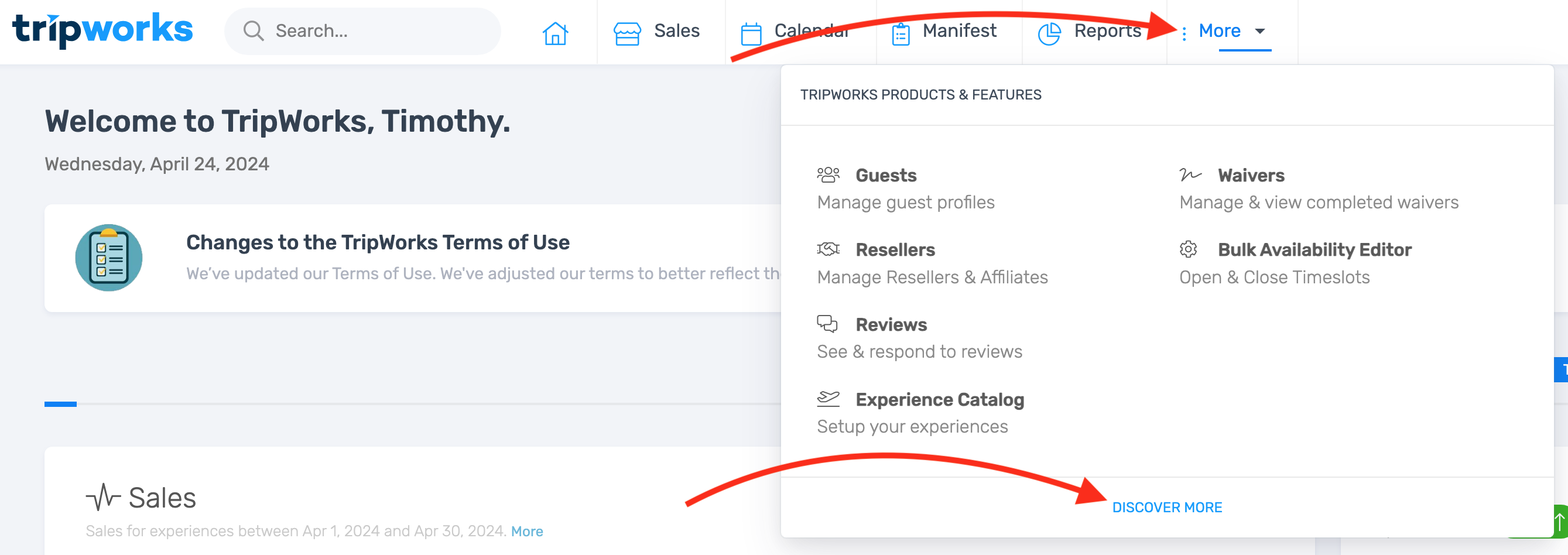
Discover More in the More menu opens Setup, where Integrations lives. - Select the integration's card and follow its setup guide, linked in the lists above.
Once it's connected, the card shows as active. If an integration hits a connection error, its card flags it so you know to check the settings.
Don't see the tool you use?
If a tool isn't listed on this page, TripWorks doesn't have a native integration with it today. You still have three ways to connect it:
- Zapier (no code). If the other tool is on Zapier, you can send it TripWorks events such as a trip reserved, a payment created, a waiver signed, or a new lead. TripWorks works as a trigger in Zapier: it sends data out, but Zapier can't create or change bookings in TripWorks. See the full list of Zapier triggers.
- Webhooks (for a system you or a developer control). TripWorks posts each event as JSON to the web address you enter, the moment it happens.
- REST API (needs a developer). Your developer's software reads and updates your TripWorks data directly. Combine it with webhooks to build a two-way connection to a tool TripWorks doesn't connect to natively.
Not sure which one fits? Does TripWorks have an API? compares them side by side.
Frequently asked questions
Does TripWorks integrate with a CRM like HubSpot or Salesforce?
No. TripWorks doesn't have a native integration with HubSpot, Salesforce, Pipedrive, Zoho, Klaviyo, ActiveCampaign, Constant Contact, or any other CRM. TripWorks keeps its own customer profiles, booking history, and leads, so many operators run their guest relationships right inside TripWorks. To get customer and booking data into an outside CRM, use one of these:
- Mailchimp (native): adds new customers' names and email addresses to the Mailchimp audience you choose. See Connect the Mailchimp integration.
- Zapier (no code): send events such as a trip reserved, a payment created, or a new lead to your CRM's Zapier app, where a Zap creates or updates the contact or deal. See Set up your Zapier integration.
- Webhooks: post booking, payment, and customer events as JSON to an address your developer or your CRM's inbound webhook provides. See Set up webhooks.
- REST API (needs a developer): read customers and bookings from TripWorks to build a fuller sync. See Set up the TripWorks REST API.
These all send data out of TripWorks. A change you make in your CRM doesn't flow back into TripWorks.
Do we integrate with QuickBooks?
No. TripWorks doesn't have a native integration with QuickBooks or Xero today. To get booking and payment data into your accounting software, use Zapier: the TripWorks Payment Created and Payout Created triggers can add records to QuickBooks Online or a spreadsheet. You can also export your data or run Finance and Payout reports and import them into your accounting tool. See Set up your Zapier integration and Reports overview.
Do you integrate with FishingBooker, Boatsetter, or other booking marketplaces?
Only the marketplaces on the Supported OTAs list connect to TripWorks. FishingBooker, Boatsetter, and other marketplaces that aren't on that list don't have a connection today. You can still add one as a Private Partner reseller to track its bookings and commission, enter or import its bookings, and keep your availability current in TripWorks so the same spots aren't sold twice.
Can I use my own Twilio for phone calls?
No. The Twilio integration is for text messages (SMS) only. It sends your guest texts from your own Twilio number, but it doesn't connect phone calls or call tracking. For calls, connect CallRail, RingCentral, Dialpad, OpenPhone, Vonage, Kixie, or CallTrackingMetrics, or let the AI Callbot answer your phone. See Connect your phone system.
Can I import bookings from another booking system?
Yes. Export your bookings from the old system as a CSV, then go to Setup → Tools → Data Importer and choose Bookings. You map your columns to TripWorks fields, so any reasonable export works. This is a one-time import, not an ongoing sync. See Using the Importer Tool.
Can TripWorks connect to Connecteam or another app that isn't on this list?
Not natively. If the app is on Zapier, you can send it TripWorks events such as new reservations or updated trips with a Zap, no code needed. If it isn't on Zapier, a developer can connect it with webhooks and the REST API. Any tool not listed on this page has no native TripWorks integration today.
Can TripWorks pull bookings from another company's API?
Not on its own. OTAs and resellers connect to TripWorks, not the other way around: they send bookings in, either through a supported OTA connection or the OCTO standard. To work with another company's system, a developer can build the connection using the TripWorks REST API and webhooks. See Does TripWorks have an API?
Can I connect Google Voice?
No. Google Voice doesn't share call data with other apps, so TripWorks can't connect to it. Google Voice and call tracking covers how to get those calls into TripWorks another way.
Do I need an outside waiver tool?
No. Waivers are built into TripWorks, so there's no connection to an outside waiver service. You build your waiver, assign it to activities, and guests sign it online or on a device at check-in. See Waivers overview.
Why don't I see an integration on my Integrations page?
Check your permissions first: the Integrations page needs the Setup integrations catalog permission. The REST API and AI Assistants cards appear only once they're turned on for your account, so contact TripWorks support if you need them. OTAs aren't on this page at all; add them under Resellers.
Do I need a developer to connect an integration?
Not for most of them. Each integration in the lists above has a guided setup, usually signing in to the other service or pasting a key or ID from it. Zapier needs no code either. Only the REST API, and webhooks sent to your own system, call for a developer.
Related
- Does TripWorks have an API?
- Set up your Zapier integration
- Set up webhooks
- Connect your phone system
- Supported OTAs
- Using the Importer Tool
Built for attractions, tours & activities
Connect the tools you already run on
See how attractions, tours, and activities connect TripWorks to their payments, marketing, and phone tools. Book a demo and make the switch.