
TripWorks recovers lost demand in two layers that work together. Abandoned-cart recovery is the automatic layer: it emails shoppers who started a booking and didn't finish, and wins many of them back without anyone lifting a finger. Lead Center is the human layer: the pipeline where those carts, along with leads from AI chat, the AI CallBot, enquiry forms, and manual entry, collect so your team can personally work the ones worth a phone call. Automation catches the many; you close the few that need a human. They're complementary, not redundant, and this article explains how they fit.
In this article
The two layers, side by side
Most operators reach for one or the other and wonder if they still need the second. You need both, because each handles a different slice of the same problem.
| Abandoned-cart recovery | Lead Center | |
|---|---|---|
| What it is | Automatic recovery emails | A pipeline you work by hand |
| Who does the work | TripWorks, on a schedule | You and your team |
| Reaches | Every eligible cart, at scale | The high-value ones you choose |
| Personalization | The same recovery message | A tailored call or reply |
| Best for | The many small wins you'd never chase | The few worth a personal touch |
Think of the automatic emails as the wide net and Lead Center as the hands that pull in the fish worth keeping. The net runs whether or not you're watching. Lead Center is where you decide which catches deserve more than an automated nudge.
How a cart becomes a lead
When a guest begins booking online but leaves before paying, TripWorks records the incomplete booking as an abandoned cart. That same near-miss also surfaces in Lead Center as a lead, so the interest you've already earned becomes something you can act on instead of a number in a report.
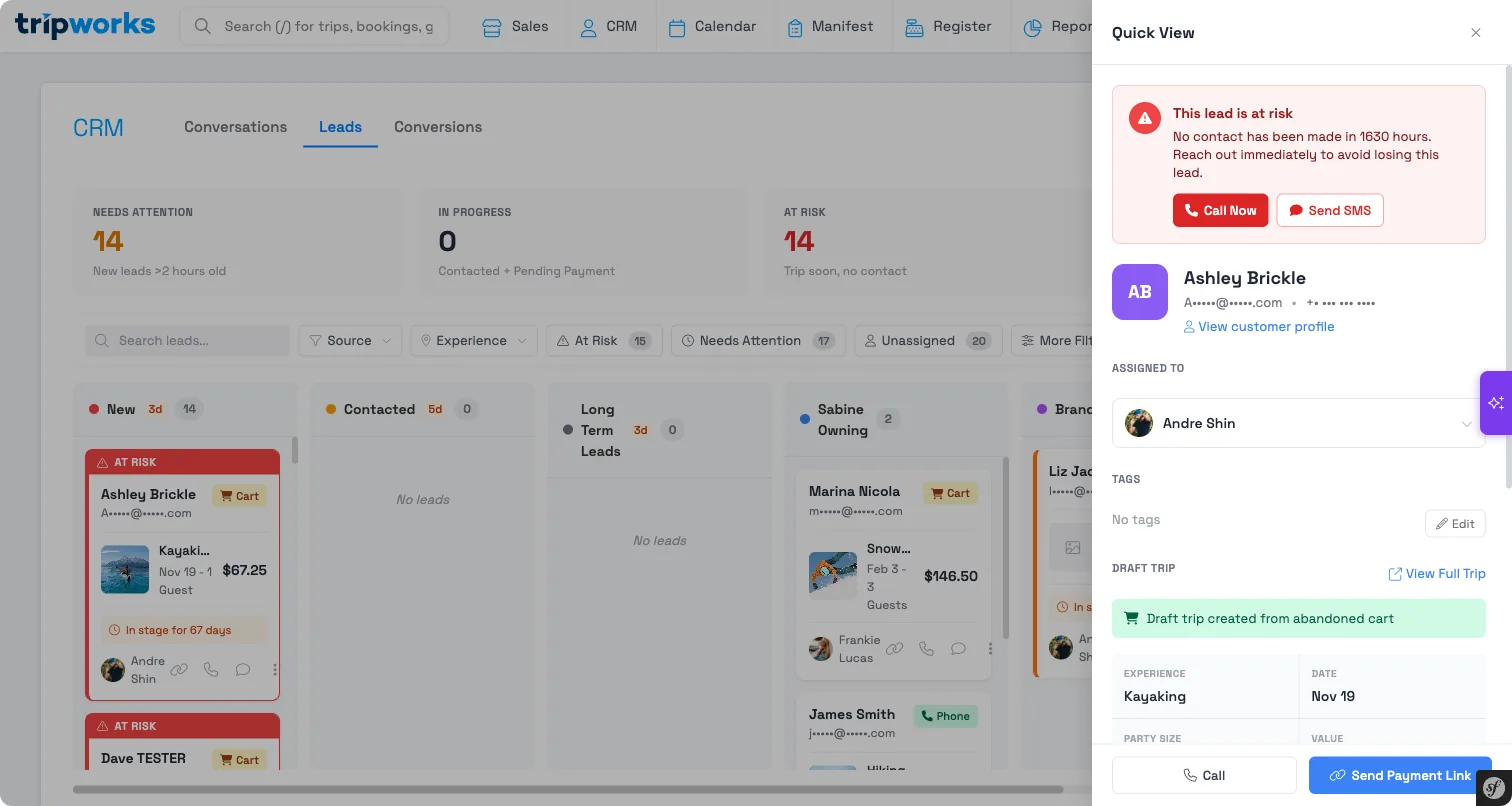
Each lead carries the context of what the guest was after: the tour, the date, and the party size they'd selected. When you follow up, you're not starting cold. You already know what they wanted; you're helping them finish.
Abandoned carts are usually your biggest and warmest source of leads. These are people who picked a date and a party size and were one step from paying. Lead Center gathers them alongside your other sources so everything lives in one list. For the full set of sources and how the pipeline works day to day, see Lead Center.
How the automatic emails move a lead's status
This is the part that ties the two layers together. Every lead sits at a status in your pipeline. New leads start at New, and as they progress they move to Contacted, then toward Pending Payment and finally Converted (or Lost if they don't come back).
When TripWorks sends an automatic recovery message for a cart, it does two things to the matching lead:
- It logs a Message sent activity on the lead's timeline, so you can see the guest was already contacted and when.
- If the lead is still at New, it moves the lead to Contacted.
That second step matters. A lead at New is one nobody has reached yet. Once the automatic email goes out, the guest has been reached, so the lead advances to Contacted on its own. Your pipeline stays honest without any manual bookkeeping: the leads still sitting at New are the ones automation hasn't touched, and the ones at Contacted have already had at least one nudge.
The automatic email only advances a lead that's still at New. If you've already moved a lead further along by hand, sending a recovery message won't drag it backward. It logs the activity, but your manual progress stands.
When to let automation run vs. follow up personally
The two layers divide the work by value and effort.
Let automation run for the everyday flow of abandoned carts. Most guests who wander off just need a timely reminder, and the recovery email delivers exactly that at no cost to your time. Chasing each one by hand would cost more than it returns. Let the net do its job, and check your pipeline for what it brings back.
Follow up personally when the opportunity is worth more than an email:
- High-value bookings — a large group, a private tour, or a peak-season date is worth a call the automation can't make.
- Leads with a real question — a lead from AI chat or the CallBot often stopped short because they needed an answer, not a reminder. Answer it and they book.
- Leads that stall after contact — a lead sitting at Contacted for a while got the automatic nudge and still hasn't finished. That's your cue to add a human touch.
- Anything you can tailor — a returning guest, a special request, a date that's nearly sold out. A personal reply lands where a template can't.
When you log a call, email, or meeting on a lead yourself, TripWorks advances it from New to Contacted the same way the automatic email does, so your manual follow-ups and the automation keep the pipeline consistent.
The rule of thumb: automation handles volume, you handle value. Let the emails recover the many small wins on their own, and spend your time on the leads where a person makes the difference.
Setting it up
Automatic recovery emails depend on the guest opting in and leaving contact details, so a guest who didn't opt in won't receive one. The setup, the opt-in, and the reporting all live in Recover abandoned carts. Lead Center needs no setup to start collecting; open it whenever you're ready to work your pipeline.
Frequently asked questions
Do I still need Lead Center if recovery emails are automatic?
Yes. Recovery emails win back the guests who just needed a reminder, but they can't make a call, answer a question, or tailor an offer. Lead Center is where those high-value leads collect so you can work them personally. The two layers cover different opportunities, not the same one.
Does sending a recovery email change the lead's status?
Yes. When TripWorks sends an automatic recovery message for a cart, it logs a "Message sent" activity on the matching lead and, if that lead is still at New, moves it to Contacted. This keeps your pipeline accurate without manual updates: leads still at New are the ones automation hasn't reached yet.
Will an automatic email undo status changes I made by hand?
No. The automatic email only advances a lead that's still at New. If you've already moved a lead further along in the pipeline, sending a recovery message logs the activity but leaves your status untouched. Your manual progress always stands.
Which leads should I follow up on personally?
Reach for personal follow-up on the high-value opportunities: large groups, private tours, peak-season dates, leads that came in with a real question, and leads that stalled at Contacted after the automatic nudge. Let automation handle the everyday flow of smaller carts, where a timely reminder is enough.
Is an abandoned cart the same thing as a lead?
An abandoned cart is an unfinished online booking; a lead is how that near-miss shows up in Lead Center so you can act on it. Every eligible abandoned cart becomes a lead, but Lead Center also gathers leads from AI chat, the AI CallBot, enquiry forms, and manual entry, so it's a wider pipeline than carts alone.
Why did a guest not get a recovery email?
Recovery emails only go to guests who opted in and left contact details. If your checkout leaves the marketing opt-in unchecked by default and the guest didn't check it, they won't receive one. The lead still appears in Lead Center so you can decide whether to reach out another way. See Recover abandoned carts.