
In TripWorks, a trip is a reservation, a trip order is one activity on that reservation, and a booking is one guest's place on that activity. Every guest, ticket, payment, and note in your account hangs off this simple chain, and the REST API uses the same words. Knowing how the pieces nest makes it much easier to find the data you want, build reports that add up, and talk to support about what you see.
In this article
In this article
- How trips, trip orders, and bookings nest inside each other
- Where each piece appears in TripWorks, and what it holds
- How customers, activities, ticket types, and sources connect to them
- How to move from one piece to another in the API
How are trips, trip orders, and bookings related?
A reservation can include more than one activity, and each activity can have several guests. TripWorks models that with three levels:
Trip            the reservation, with a confirmation code
└─ Trip order   one activity on that reservation, at one date and time
   └─ Booking   one guest's place on that activity
A family that books a fishing trip for three and a lunch cruise for two on the same reservation has one trip, two trip orders (fishing and the cruise), and five bookings (three on the fishing trip order and two on the cruise).
The words need a little care, because people use them loosely. Staff often say "booking" or "reservation" for a whole party, and "guests" for the people in it. In TripWorks data, a trip is the whole party's reservation and a booking is a single guest. When you read a count, check which one it is: in analytics, bookings counts trips and guests counts people.
Where do you see each piece in TripWorks?
Open any trip in TripWorks and the page lays the chain out for you.
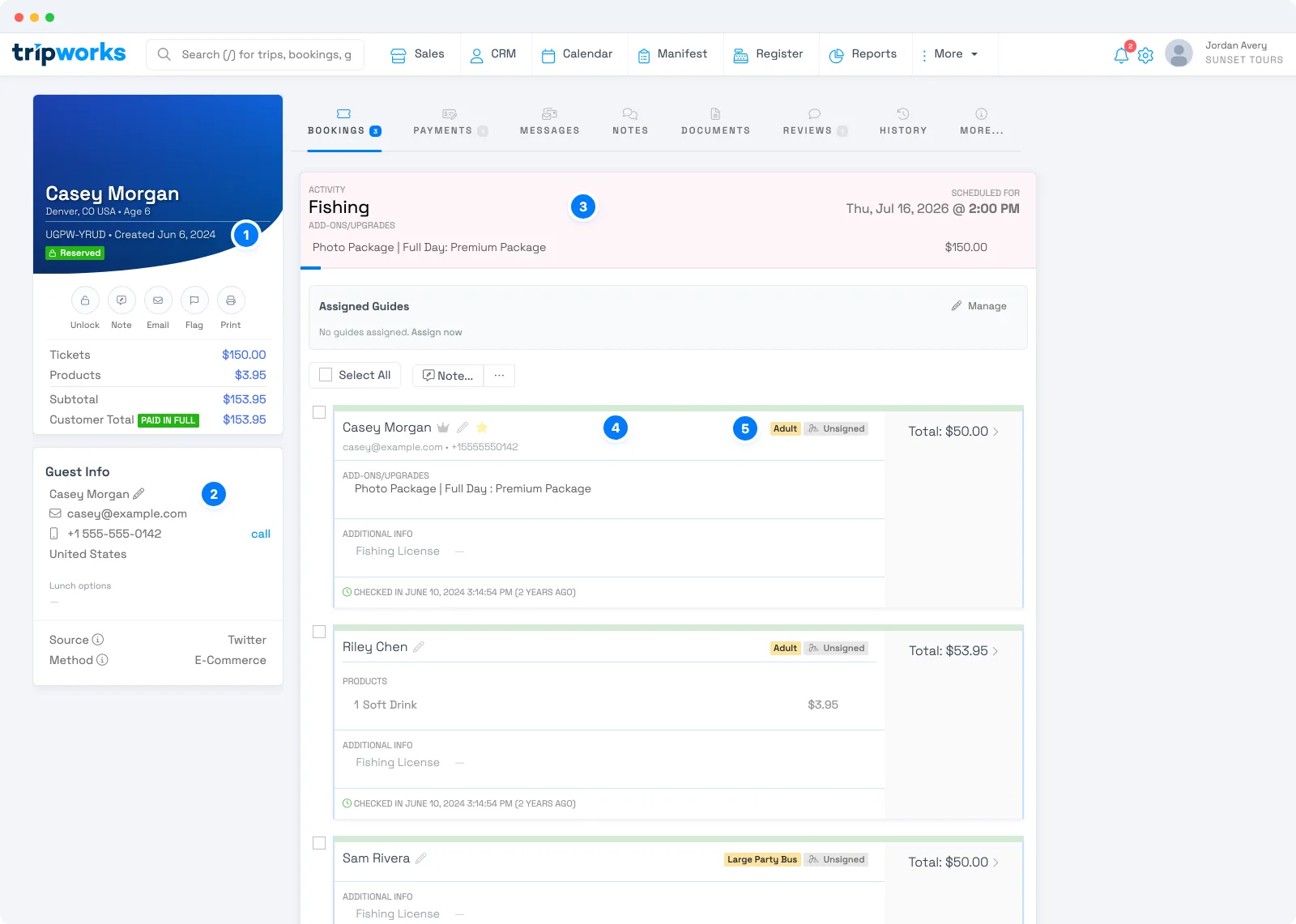
- Trip. The confirmation code and the status, here Reserved. The totals beneath (tickets, products, subtotal, and customer total) add up everything on the trip.
- Customer. The guest profile for the person who made the reservation, with their contact details. The Source and Method below it record where the sale came from.
- Trip order. The activity section, here Fishing, with the date and time it is scheduled for. Add-ons and upgrades for the activity are listed here.
- Booking. One card for each guest. Each card holds that guest's add-ons, products, additional information, check-in, and total.
- Ticket type. The tag on a booking, such as Adult, says which ticket that guest holds.
What does each piece hold?
-
Trip. The reservation as a whole. It has a confirmation code and a status: draft, review, reserved, or deleted. It records its customer, its source, when it was created, when it was reserved, and its sale date. It holds one or more trip orders. In the API, trips are at
/rest/trips. -
Trip order. One activity on the trip at one date and time. It groups the bookings for that activity, and it has its own id, the
trip_order_id, that you use to find them. Several trip orders on one trip means several activities on one reservation. -
Booking. One guest's place. It holds the ticket type, a status, whether waivers are signed, and the guest's add-ons, products, custom fields, and assigned resources. A booking's total is its ticket price plus products, add-ons, taxes, and fees. It is the price, not a balance due. In the API, bookings are at
/rest/bookings, with the add-ons, products, custom fields, resources, and waivers of each booking beneath it. -
Customer. The guest profile: name, contact details, and history. A trip points to its customer, and the same customer can have many trips. In the API, customers are at
/rest/customers. - Activity. The thing you sell, called an experience in the API. Each activity has its ticket types.
-
Ticket type. The kind of ticket a guest holds, such as adult or child. In the API it is the experience customer type, and a booking says which one it uses with
experience_customer_type_id. -
Trip source. Where a sale came from, such as your website or a partner. Trips point to their source. In the API, sources are at
/rest/trip-sources.
Amounts throughout are whole numbers of cents, so 15000 means $150.00.
How do you move between the pieces in the API?
Each piece carries the id of the one above it, so you can walk the chain in either direction with a filter.
-
From a trip to its guests. List bookings with
GET /rest/bookings?trip_order_id=..., using the trip order's id. -
From a guest profile to everything they booked. List bookings with
GET /rest/bookings?customer_id=..., or trips withGET /rest/trips?customer_id=.... -
From a confirmation code to the trip. List trips with
GET /rest/trips?confirmation_code=.... -
From a source to its sales. List trips with
GET /rest/trips?trip_source_id=.... -
From a ticket type to the guests who hold it. List bookings with
GET /rest/bookings?experience_customer_type_id=.... -
From waivers to the guests who still owe one. List bookings with
GET /rest/bookings?booking_waiver_status=unsigned.
Ids in the API are unique identifiers, so you copy them from a response rather than build them. Trips can also be found by their confirmation code.
Examples
- Count guests, not reservations. To report how many people are coming on a departure, count bookings, not trips.
- Show a party's whole reservation. Look up the trip by its confirmation code, then list the bookings for each of its trip orders.
-
Find every guest who booked a particular ticket type. Filter bookings by
experience_customer_type_id. -
See where your sales came from. Filter trips by
trip_source_idand sum the totals. -
Chase unsigned waivers for tomorrow. Filter bookings by
booking_waiver_status=unsignedand read each guest's contact through their customer. - Move one guest's history into your CRM. Read the customer, then list their trips and bookings with the customer filters.
Frequently asked questions
What is the difference between a trip and a booking in TripWorks?
A trip is a whole reservation, with a confirmation code, which can include several activities. A booking is one guest's place on one of those activities. A reservation for a family of four on one activity is one trip and four bookings.
What is a trip order?
A trip order is one activity on a trip, at one date and time. It sits between the trip and its bookings. A trip with two different activities has two trip orders, and each one groups the guests who are on that activity.
Why do the numbers differ between trips and bookings?
Because a trip counts a whole party once, while bookings count each guest. If you want the number of people, count bookings. If you want the number of reservations, count trips. In analytics, bookings counts trips and guests counts people, so read the labels carefully.
How do I find all the guests on a trip?
List bookings and filter by the trip order's id, as in GET /rest/bookings?trip_order_id=.... A trip with several activities has several trip orders, so repeat the request for each one to get every guest on the trip.
What is the difference between a customer and a booking?
A customer is a guest profile, with contact details and history, and it can have many trips over time. A booking is one guest's place on one activity of one trip. A booking can point to a customer so you can see everything that person has booked.
What is the API name for an activity?
An activity is called an experience in the API, at /rest/experiences. Its ticket types are its experience customer types, and a booking says which one it holds with experience_customer_type_id.
Are amounts in dollars or cents?
Cents. Amounts are whole numbers in the smallest unit of your currency, so 15000 is $150.00. A booking's total is its ticket price plus products, add-ons, taxes, and fees. It is the price, not the balance due.
Related
- Get started with the REST API
- Does TripWorks have an API?
- How API keys and access work
- Build integrations that stay fast and efficient
Built for attractions, tours & activities
Build on top of your booking data
See how attractions, tours, and activities connect their booking data to the tools they already use with TripWorks. Book a demo and make the switch.