
Your TripWorks data is hosted on Amazon Web Services (AWS), kept separate from every other account's data, encrypted, and backed up automatically, and you can export it whenever you want. This page explains each of those, in plain terms, for you or for anyone reviewing TripWorks on your behalf.
In this article
In this article
- TripWorks runs on AWS, behind Amazon CloudFront and a web application firewall.
- Every request is limited to the account that is signed in.
- Stored data is encrypted, and connections to TripWorks use HTTPS.
- Data is backed up automatically, and you can export your own data at any time.
Where your data is hosted
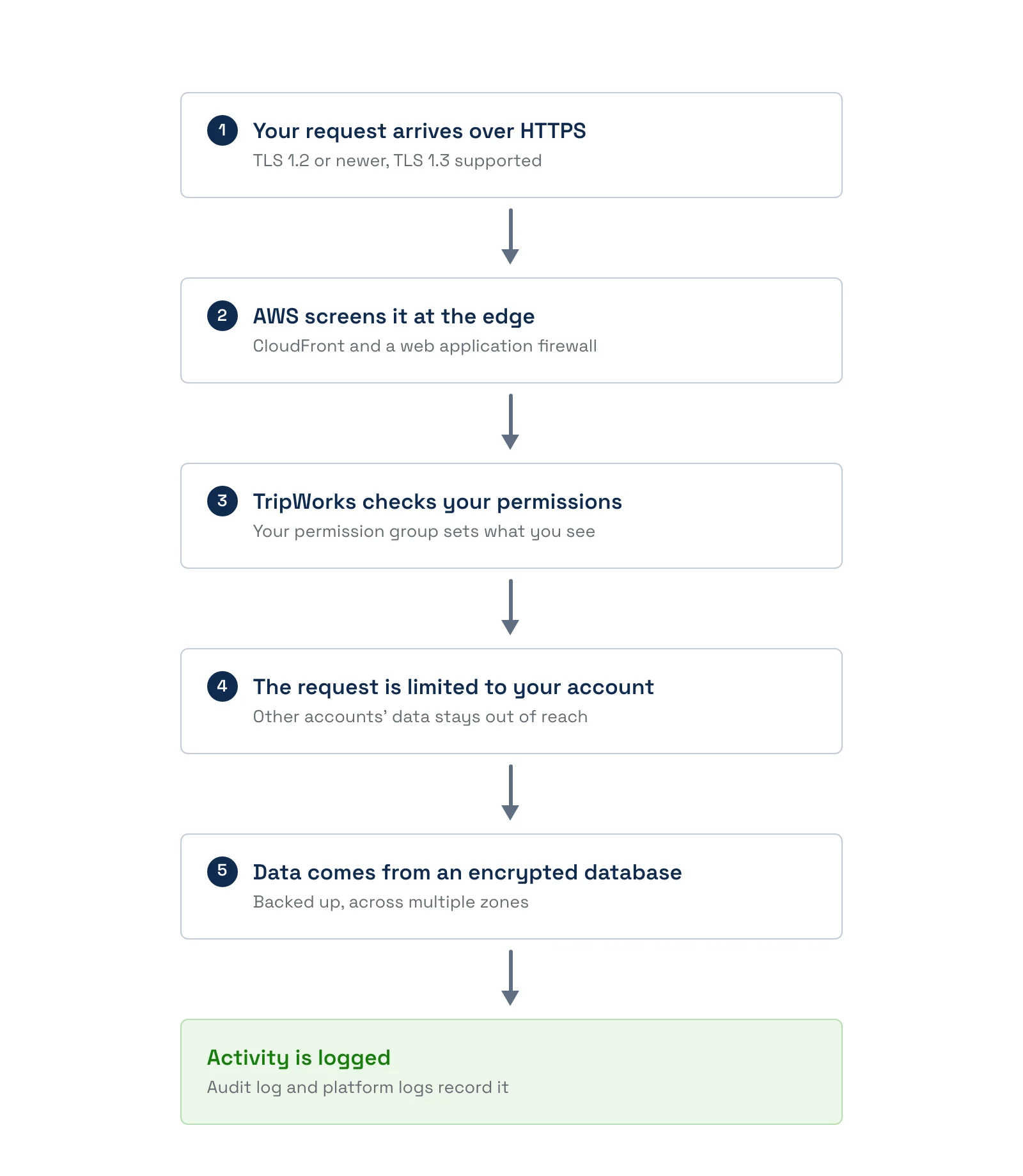
TripWorks runs on Amazon Web Services (AWS), whose data centers and network are built for the most security-sensitive organizations. See AWS cloud security and AWS compliance programs. Traffic reaches the platform through Amazon CloudFront, and a web application firewall screens incoming requests before they reach the application. The database that holds your bookings, guests, and settings runs across multiple AWS availability zones, so the platform keeps running if one data center has a problem.
How your data is kept separate
Your data is isolated from every other account on TripWorks. Every request is limited to the account that is signed in, so other operators can't see your bookings, guests, or settings. Within your own account, you decide who can see what with permission groups.
How your data is encrypted
- In transit. Connections to the TripWorks app use HTTPS with TLS 1.2 or newer, and TLS 1.3 is supported. What your team and your guests send to the platform is encrypted on the way, and older, weaker protocol versions are refused.
- At rest. Your data is stored in an encrypted Amazon Aurora database. The encryption keys are managed in AWS Key Management Service and rotated automatically.
- Card details. Guests' card details go directly to Stripe and aren't stored by TripWorks. See How TripWorks protects your business.
Backups
Your data is backed up automatically, so you don't need to schedule anything or press a button.
Your data is yours
You can export your customers, bookings, and more whenever you need to. Exports are yours to keep, so you can move your data into a spreadsheet or another system. See Export your customers, bookings & data.
Activity logs
- Your audit log records who changed what and when, with 18 months of history that you can filter and export. See Use the audit log.
- Platform logs. TripWorks records platform activity in AWS CloudWatch, so engineers can trace what happened and when if something goes wrong.
Examples
- Tell a hotel partner where your booking data is hosted. TripWorks runs on Amazon Web Services, and the encryption section covers how it's protected.
- Answer your insurer's question about guest data. Connections use HTTPS, stored data is encrypted, and card details go straight to Stripe.
- Take a copy of your customers and bookings. Use the export tools whenever you want a copy for a spreadsheet or another system.
- Show an auditor how changes are tracked. Export the audit log for the date range they ask about.
Frequently asked questions
Where does TripWorks store my data?
TripWorks is hosted on Amazon Web Services (AWS). The database that holds your bookings, guests, and settings runs across multiple AWS availability zones.
Is my data encrypted?
Yes. Connections to TripWorks use HTTPS, so data is encrypted in transit, and the database that stores your data is encrypted at rest with keys managed in AWS Key Management Service. Card details go directly to Stripe and aren't stored by TripWorks.
Can other TripWorks customers see my data?
No. Every request is limited to the account that is signed in, so your bookings, guests, and settings are only available to people you've given access to.
Is my data backed up?
Yes. Backups run automatically, so you don't need to do anything.
Can I export my data?
Yes. You can export your customers, bookings, and more at any time. See Export your customers, bookings & data.
Does TripWorks keep logs of what happens in my account?
Yes. Your audit log shows who changed what and when. TripWorks also records platform activity in AWS CloudWatch. See Use the audit log.
My company needs more detail than this page for a security review. What do I do?
Send your questionnaire to us through Contact us and our engineering team will complete it.
Related
- How TripWorks protects your business
- Keeping your account secure
- Export your customers, bookings & data
- Use the audit log
Built for attractions, tours & activities
Payments that just work
See how attractions, tours, and activities take secure card payments on TripWorks. Book a demo and make the switch.