
TripWorks keeps each account's data isolated, runs on a hardened Amazon Web Services (AWS) foundation, gives you control over who on your team can see and do what, and logs activity so changes can be traced. Guests' card payments are handled separately by a PCI DSS Level 1 payment processor. This page is the overview, and it covers the areas operators and their IT or finance teams ask about most.
In this article
In this article
- Every request in TripWorks is limited to the account that is signed in.
- TripWorks is built on AWS: a web application firewall, encrypted and backed-up databases, and continuous activity and configuration monitoring.
- You control team access with permission groups, and an audit log shows who changed what.
- Card payments go straight to Stripe, a PCI DSS Level 1 Service Provider.
- If your team has a security questionnaire, we complete it for you.
Your data, kept separate
Your account's data is isolated from every other account on TripWorks. Every request is limited to the account that is signed in, so one operator can't see another operator's bookings, guests, or settings. You can also export your own data whenever you need it. See Export your customers, bookings & data and Where your data lives and how it's protected.
Built on Amazon Web Services
TripWorks is built on top of AWS, and that foundation matters. AWS designs its data centers, network, and core services for the most security-sensitive organizations, and it maintains independent certifications and attestations, including SOC 1, SOC 2, SOC 3, ISO 27001, and PCI DSS. We use its security services at every layer, from the edge to the database.
Every request follows the same path.
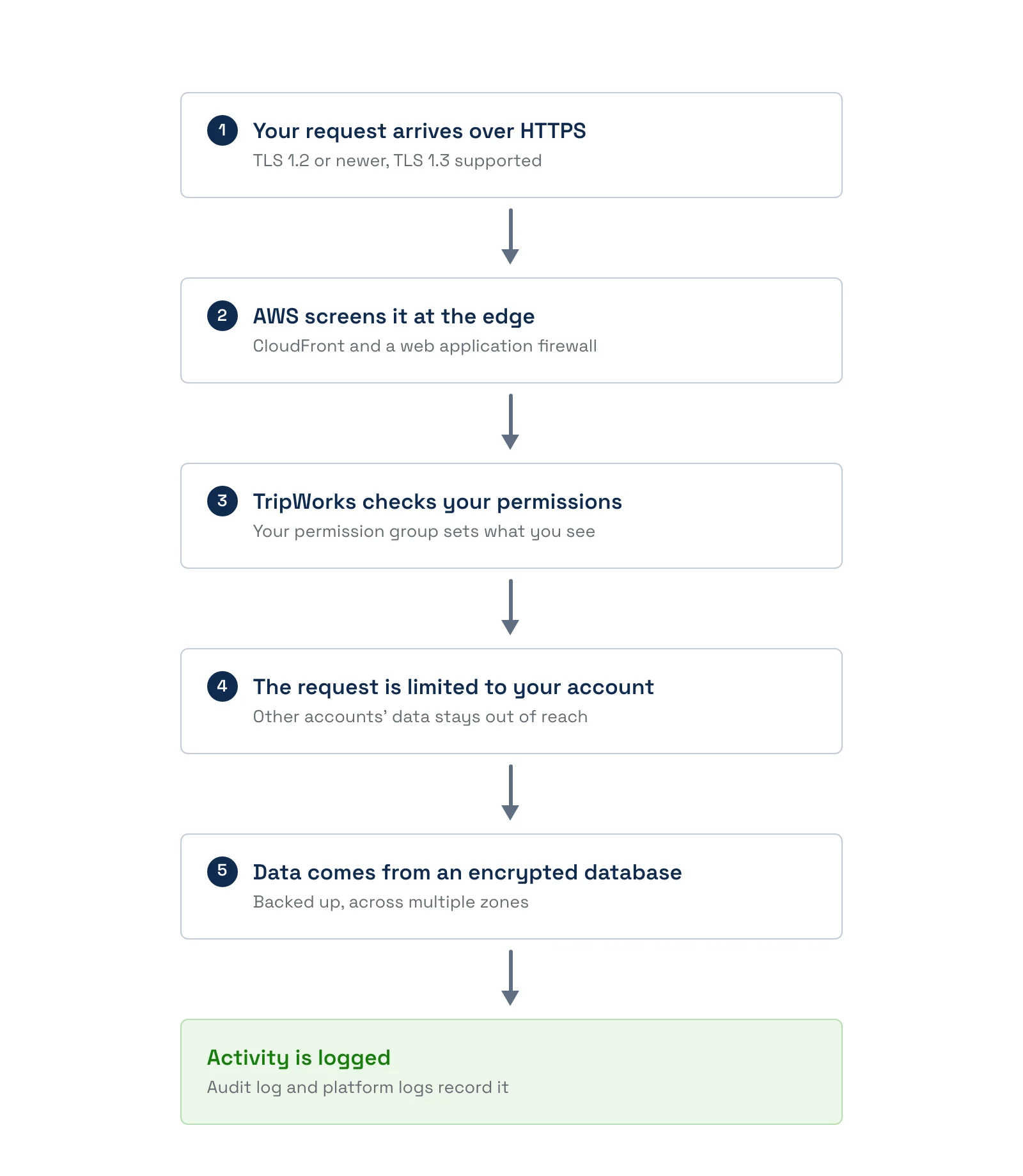
- A web application firewall in front of the platform. Traffic reaches TripWorks through Amazon CloudFront and is screened by AWS WAF before it reaches the application. The firewall uses AWS-managed rule sets that block common web attacks, known bad inputs, and SQL injection attempts. It also rate-limits traffic and blocks known attackers and scanners.
- Encrypted in transit. Connections to the TripWorks app use HTTPS with TLS 1.2 or newer, and TLS 1.3 is supported, so older and weaker protocol versions are refused.
- Encrypted databases. Your data is stored in Amazon Aurora, encrypted at rest with keys managed in AWS Key Management Service, which rotates them automatically.
- Resilient and backed up. The production database runs across multiple AWS availability zones, is backed up automatically, and is protected against accidental deletion.
- Secrets kept out of everyday reach. Application credentials are stored in AWS Secrets Manager.
- Controlled engineer access. TripWorks engineers sign in to AWS through AWS IAM Identity Center single sign-on.
- Continuous configuration checks. AWS Security Hub checks our AWS configuration against the CIS AWS Foundations Benchmark and AWS Foundational Security Best Practices.
AWS's certifications cover AWS's own infrastructure. How we configure and run TripWorks on top of it is our responsibility, which AWS calls the shared responsibility model. To learn more, see AWS cloud security, AWS compliance programs, and the AWS shared responsibility model.
Control over your team's access
- Everyone gets their own login. Invite each person separately instead of sharing one. See Add and manage team members.
- Permission groups decide what each person can see and do, such as taking refunds or changing setup. See Permission groups.
- You can see when each person last logged in on your team members list.
- The audit log shows who changed what and when. See Use the audit log.
For a step-by-step checklist, see Keeping your account secure.
Logging and monitoring
- Your audit log. Changes to bookings, prices, and settings are recorded with who made them and when, and the log keeps 18 months of history. You can filter it and export it.
- Platform activity logs. TripWorks records application activity in Amazon CloudWatch, along with database error and slow-query logs, so our engineers can trace what happened and when if something goes wrong.
- AWS account activity. AWS CloudTrail records activity in our AWS account across regions, with log file integrity validation so records can't be altered unnoticed.
Your guests' payments
- Stripe processes every card payment. Online, guests type their card into Stripe's secure payment fields. In person, TripWorks card readers encrypt the card inside the reader.
- Stripe is certified as a PCI DSS Level 1 Service Provider, the highest level of payment security certification.
- Guests' card details go directly to Stripe. They never pass through TripWorks' own forms, and TripWorks doesn't store them.
- TripWorks never stores full card numbers or security codes. For a saved card, we keep only Stripe's reference to it, plus the brand, last 4 digits, expiration date, and cardholder name.
- 3D Secure runs automatically when a guest's bank asks for it.
For the full picture, including fraud alerts, chargebacks, and in-person payments, see How TripWorks protects card payments. You can also read Is my card saved when I book online? and Does TripWorks support 3D Secure (SCA)?.
Continuous hardening
We scan our code and the software it depends on for known vulnerabilities, and we ship security fixes as part of our regular releases.
Examples
- Find out who changed a price last week. Open the audit log and filter by the activity or the team member to see what changed and when.
- Check what a new front desk hire can do. Open their team member profile and look at their permission group.
- Answer your insurer's question about card numbers. Card details go straight to Stripe and TripWorks doesn't store them. The Your guests' payments section has the details.
- Send your IT contact or a business partner a link that explains how TripWorks is protected. Share this page, or Where your data lives and how it's protected.
- Hand an auditor a record of who changed what. Export the audit log for the date range they ask about.
- Fill in a security questionnaire from a partner or venue. Send it to us through Contact us and our engineering team will complete it.
Frequently asked questions
Is TripWorks secure?
Yes. Your account's data is kept separate from every other account's. The platform runs on AWS behind a web application firewall, with encrypted and backed-up databases and continuous activity logging. You control your team's access with permission groups and an audit log, and card payments are handled by Stripe, a PCI DSS Level 1 Service Provider.
Where is TripWorks hosted?
TripWorks runs on Amazon Web Services (AWS). See Where your data lives and how it's protected.
Does TripWorks use a web application firewall?
Yes. Traffic passes through AWS WAF, which uses AWS-managed rule sets for common web attacks, known bad inputs, and SQL injection, plus rate limiting and blocking of known attackers and scanners.
Is my data encrypted?
Yes. Connections to TripWorks use HTTPS, and the database that stores your data is encrypted at rest with keys managed in AWS Key Management Service. Card details go directly to Stripe and aren't stored by TripWorks.
Can another TripWorks customer see my data?
No. Every request is limited to the account that is signed in, so your bookings, guests, and settings are only available to people you've given access to.
Does TripWorks store my guests' credit card numbers?
No. Card numbers go straight to Stripe. For a saved card, TripWorks keeps only Stripe's reference to it plus the brand, last 4 digits, expiration date, and cardholder name. Security codes are never stored.
Is TripWorks PCI compliant?
Card data is handled by Stripe, which is certified as a PCI DSS Level 1 Service Provider. Guests enter cards into Stripe's secure payment fields, and TripWorks card readers encrypt the card inside the reader. TripWorks doesn't store full card numbers or security codes.
Does TripWorks keep logs of activity in my account?
Yes. Your audit log records who changed what and when, with 18 months of history that you can filter and export. TripWorks also records platform activity in Amazon CloudWatch and AWS account activity in AWS CloudTrail. See Use the audit log.
My company has a security questionnaire. What should I do?
Send it to us through Contact us and our engineering team will complete it. Include the due date and mention that it is a security questionnaire.
Can I export my data?
Yes. You own your data and can export your customers, bookings, and more at any time. See Export your customers, bookings & data.
Related
- How TripWorks protects card payments
- Where your data lives and how it's protected
- Keeping your account secure
- Protecting your guests' personal data
- TripWorks security FAQ
Built for attractions, tours & activities
Payments that just work
See how attractions, tours, and activities take secure card payments on TripWorks. Book a demo and make the switch.