
A voucher code redeems a ticket that was already paid for somewhere else. The classic case: a guest buys on Groupon or Travelzoo, the reseller collects the money, and gives the guest a code. The guest brings that code to you, and it comps the booking — because you've already been paid. You issue these as batches of unique, single-use codes: one code per buyer, each redeemed exactly once.
In this article
This is a different job from a promo code, not just a different code count:
- A promo code is a discount on a sale you're making. A guest enters
SUMMER20, and you still collect the reduced payment through TripWorks. It's a promotion. - A voucher code is a redemption of a sale that already happened. The reseller usually has the money already, so the code is a full comp on your side — you're fulfilling a ticket, not discounting a new one.
So reach for voucher codes to honor reseller and prepaid-campaign sales where each buyer holds their own code; reach for a promo code to run a discount on the bookings you sell directly.
Set up a voucher campaign
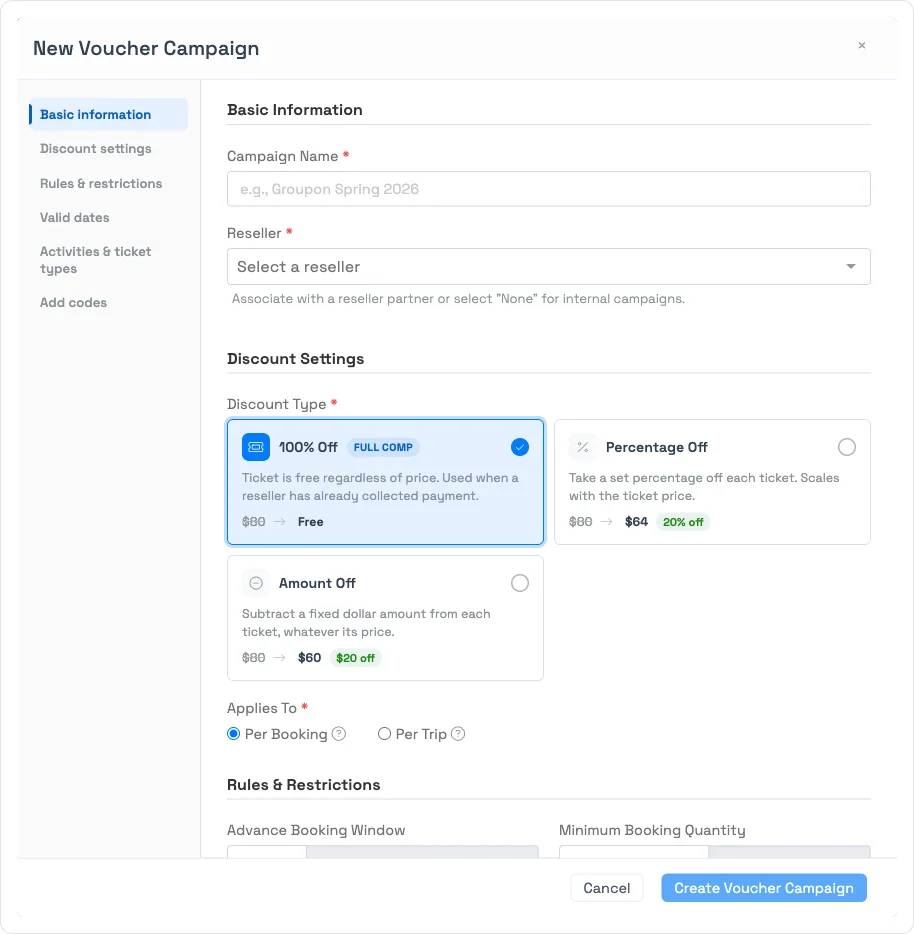
Codes live in a voucher campaign — a batch that defines the deal for every code inside it. Go to Setup Sell online Voucher Codes and select New Voucher Group. A step-by-step form opens: give the campaign a name, then pick a Reseller partner (Groupon, Travelzoo, and so on) or None for an internal campaign.
Discount types
Each campaign applies one discount to every code in it:
- 100% Off (Full comp) — the ticket is free regardless of price. This is the common reseller case: Groupon or Travelzoo already collected payment from the guest, so the code fully comps the booking on your side.
- Percentage Off — takes a set percentage off each ticket; it scales with the ticket price.
- Amount Off — subtracts a fixed dollar amount from each ticket, whatever its price.
Choose whether the discount applies Per Booking (each ticket individually — 100% off with 4 guests means all 4 tickets are free) or Per Trip (once for the whole booking — $10 off per trip on a 4-guest booking is $10 total).
Rules, dates, and scope
You can fence a batch so its codes only redeem where you intend:
- Advance Booking Window and Minimum Booking Quantity — require booking a set number of days ahead, or a minimum number of guests per booking.
- Prevent Online Use — make the codes staff-redeemable only, not usable through your e-commerce widgets.
- Day-of-week restrictions and blackout dates — block specific weekdays (with All / Weekends / Weekdays shortcuts) or specific calendar dates like holidays.
- Valid dates — a start (and optional end) date; codes only redeem for experiences inside that range.
- Activities & ticket types — scope the batch to selected activities, and to all ticket types or specific ones.
Add the codes
In the Add codes step you either upload a file — a CSV or TXT with one code per row and no header, up to 10,000 codes per upload (the list a reseller like Groupon gives you) — or enter them manually. Codes can contain letters (A–Z), numbers (0–9), and hyphens, with no spaces, and are automatically converted to uppercase. A sample CSV template is available in the form.
How redemption works
A guest enters a voucher code at checkout; staff can also apply one to a booking. Each code moves through a lifecycle:
- Available — unused, ready to redeem.
- Pending — reserved for an in-progress trip while payment is confirmed. If that checkout is abandoned (a draft left more than an hour), the code is automatically released back to Available.
- Redeemed — used on a completed booking. It can't be used again.
A code is refused if it's already redeemed (or pending on someone else's live trip), expired or outside its valid dates, or the trip doesn't meet the campaign's rules — too few guests, a blacked-out day, or an activity that isn't in scope.
Find a voucher code with search
Type at least 4 characters of a voucher code into global search to find it, whether it's still available or already redeemed. A redeemed code's result links straight to the trip it was used on, so if a guest asks about a booking they made with a voucher, you don't need to dig through the batch to find it.
Frequently asked questions
What's the difference between a promo code and a voucher code?
They do different jobs. A promo code is a discount on a sale you're making — a guest enters one shared code and you collect the reduced payment. A voucher code redeems a ticket already paid for elsewhere — typically a reseller like Groupon or Travelzoo already collected the money, so the code comps the booking on your side. (Promo codes are one reusable code; vouchers come in batches where each code is used once.)
Can a voucher code be used more than once?
No. Each voucher code is single-use — once it's redeemed it can't be used again. If you need one code many people can use, create a promo code instead.
A voucher code shows as "pending" — what does that mean?
It's reserved for a checkout that hasn't finished paying. If that booking is abandoned (left as a draft for over an hour), the code is automatically released back to Available so it can be used again.
How do I add the codes — upload or type them?
Both are supported. In the campaign's Add codes step you can upload a CSV or TXT file (one code per row, no header, up to 10,000 per upload — for example the list Groupon provides) or enter codes manually. Codes may use A–Z, 0–9, and hyphens, and are converted to uppercase.
A reseller like Groupon already charged the guest — which discount do I use?
Use 100% Off (Full comp). The ticket is free on your side because the reseller already collected payment; the voucher code simply comps the booking when the guest redeems it.
How do I find a booking a guest made with a voucher code?
Type at least 4 characters of the voucher code into global search (press /). It finds the code whether it's still available or already redeemed, and a redeemed code's result links straight to the trip it was used on.
Related
Built for attractions, tours & activities
Run reseller and campaign deals without leaks
See how attractions, tours, and activities redeem Groupon, Travelzoo, and campaign vouchers — each code exactly once — in one place on TripWorks. Book a demo and make the switch.