
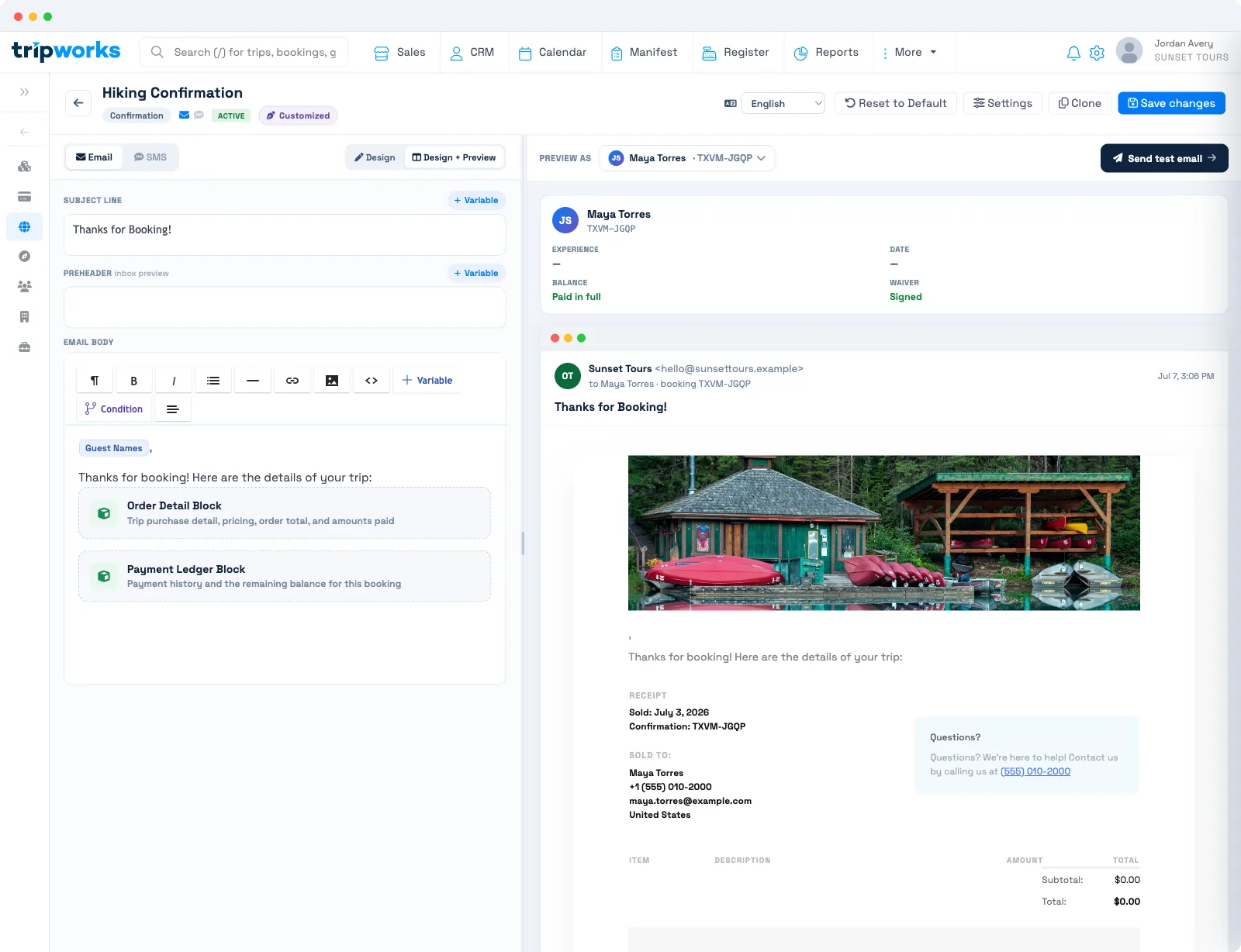
TripWorks doesn't have a separate "receipt" template type. Your booking Confirmation template is the receipt — it shows the guest what they bought and what they paid. You give it that receipt detail by adding two blocks: the Order Detail Block and the Payment Ledger Block. For gift cards, the Gift Card confirmation template plays the same role.
In this article
Turn your Confirmation into a receipt
The Confirmation template already sends when a guest books. Add the purchase and payment detail so it doubles as proof of payment.
- Go to Setup Sell online Message Templates and open your Confirmation template.
- Place your cursor in the email body where the receipt detail should appear.
- Insert the Order Detail Block to list the booked items and order total.
- Insert the Payment Ledger Block to show payments, refunds, and any remaining balance.
The Studio saves your changes on its own. From then on, every confirmation that sends carries an itemized receipt filled in with that guest's real order and payment amounts. For the full editor walkthrough, see create, edit & manage message templates.
The Order Detail Block lists each ticket with its price. Add-ons that are priced per guest appear underneath that guest's ticket. Add-ons that cover the whole party appear once, under Added for the group beside the totals, with a quantity when there is more than one. If the booking has a pickup, the receipt also shows the pickup choice and its time.
Preview the template with Preview as against a real booking to confirm the order and payment amounts read the way you want before it goes live.
Why there's no separate receipt type
A receipt is just a confirmation that shows the money. Rather than maintain a second template that duplicates your confirmation, TripWorks builds the receipt detail into the Confirmation template through the Order Detail and Payment Ledger blocks — so one template both confirms the booking and serves as the receipt. If you'd rather send a receipt on demand instead of only at booking, build a User Defined Message template with the same two blocks and send it by hand whenever a guest asks.
Gift card receipts
A gift-card purchase has its own receipt: the Gift Card confirmation template. It confirms the purchase and gives the buyer their gift-card details, the same way the booking Confirmation covers an activity purchase.
Frequently asked questions
Does TripWorks have a dedicated receipt template?
No. The booking Confirmation template acts as the receipt. Add the Order Detail Block and Payment Ledger Block to it so it shows what the guest bought and paid.
Which blocks make a confirmation into a receipt?
The Order Detail Block (the items and order total) and the Payment Ledger Block (payments, refunds, and any balance). Together they give the guest a full itemized receipt.
How do I send a receipt for a gift card?
Use the Gift Card confirmation template. It's the receipt for a gift-card purchase, separate from the booking Confirmation.
Can I send a receipt on demand instead of at booking?
Yes. Build a User Defined Message template with the Order Detail and Payment Ledger blocks, then send it to the booking by hand whenever a guest asks for proof of payment.
Related
Built for attractions, tours & activities
Give guests a receipt they trust
See how attractions, tours, and activities send clean, itemized receipts and confirmations on TripWorks. Book a demo and make the switch.