
Selling to a tax-exempt customer — a school, a university, a nonprofit? You can remove tax from that specific booking so they pay the tax-free total, then take their card as usual.
In this article
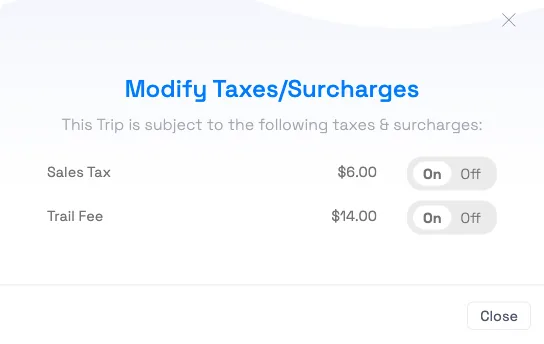
Remove the tax from the booking
- Build the booking as normal — add the activity, guests, and date/time — and open the trip.
- In the trip's cost breakdown, find the tax line you need to remove (for example Sales Tax).
- Click the pencil next to it to open Modify Taxes / Surcharges.
- Toggle each tax the customer is exempt from to Off. The line strikes through and the total recalculates immediately.
- Close the modal, confirm the new tax-free total, and take payment (charge a card or charge a card on file).
Do this before you take payment — once a trip is fully paid and locked, the tax edit isn't available.
Removing tax needs the Tax Exempt Edit permission. If you don't see the pencil next to a tax line, ask an account owner to grant it — see the user permissions reference.
Exemption is per booking, not per customer
There's no "this customer is always exempt" switch — exemption is set on the individual booking. So if a tax-exempt customer books again, toggle the tax off again on the new booking.
If a tax is usually exempt for you (say most of your sales are wholesale), flip it around: set that tax to "Exempt by default on new trips" in Setup Taxes, and only switch it on for the bookings that owe it. See set up taxes & surcharges.
Frequently asked questions
How do I take a tax-exempt card sale?
Build the booking, open the trip, click the pencil next to the tax line, toggle the tax Off in Modify Taxes / Surcharges, then take the card payment on the now tax-free total. Do it before the trip is paid and locked.
Can I mark a customer as permanently tax-exempt?
No — exemption lives on the booking, not the customer record. For a repeat exempt customer, toggle the tax off on each new booking. If most of your sales are exempt, set the tax to "exempt by default" and switch it on only when it applies.
I don't see a way to remove the tax. Why?
Two common reasons: your user doesn't have the Tax Exempt Edit permission, or the trip is already paid/locked. Ask an account owner for the permission, and make the change before finalizing payment.
Does removing tax recalculate the total right away?
Yes. When you toggle a tax off, the line is struck through and the trip total updates immediately, including on every booking and line item — so the amount you collect is already correct.
Can I remove just one tax and keep another?
Yes. The Modify Taxes / Surcharges modal lists each applicable tax with its own On/Off toggle, so you can exempt one (say state sales tax) while keeping another that still applies.
Will the receipt show that no tax was charged?
Yes — the exempted tax drops off the trip's totals, so the receipt and reports reflect the tax-free amount. See Send or print a receipt for a booking.
What if I already took payment and then realized they're exempt?
Once a trip is paid and locked the tax toggle isn't available. You'd handle the difference as a refund of the tax amount. It's cleaner to set the exemption before collecting payment.
Related
- Set up taxes & surcharges
- Add products to a booking & charge the card on file
- User permissions reference
Built for attractions, tours & activities
Handle every kind of sale, cleanly
See how attractions, tours, and activities take tax-exempt sales on TripWorks. Book a demo and make the switch.