
Every booking in TripWorks is stamped with a Method: how it was created. A guest booking on your website, a call your team took, a sale from a reseller, and a booking made by your AI assistant each get their own Method. This article explains the ten Methods you can see, where each one comes from, and where to read it.
In this article
- The ten Methods and what creates them
- Online bookings from guests
- Bookings from your AI assistants
- Bookings your team enters
- Bookings from resellers
- Bookings you import
- Where you see the Method
- Method, source, and reseller are three different things
- Change a booking's Method
- Examples
- Frequently asked questions
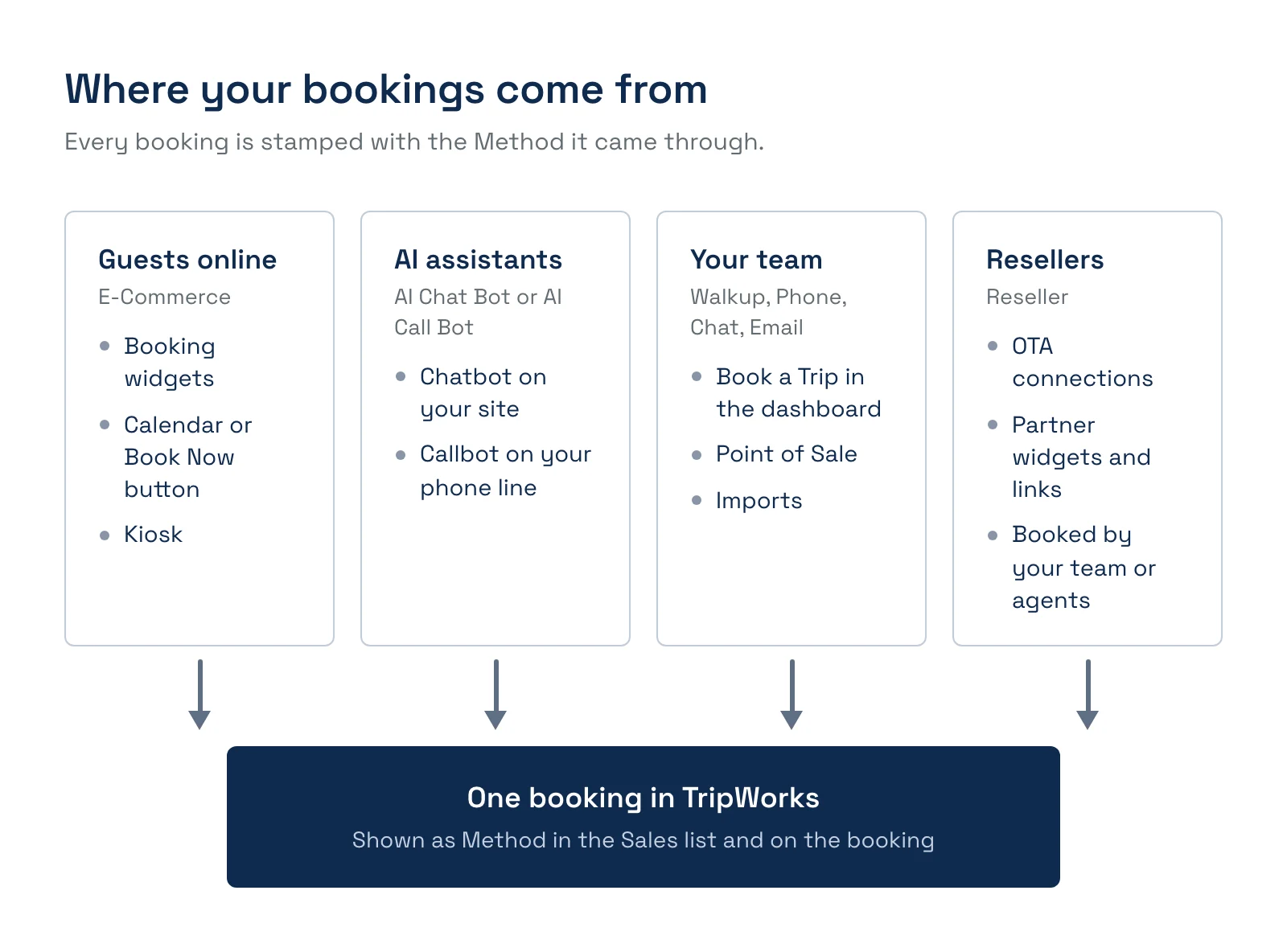
The ten Methods and what creates them
The Method list is fixed. You can't add, rename, or remove Methods.
- E-Commerce. A guest booked online. Created by your booking widgets, calendar, Book Now button, booking link, or kiosk, with no one logged in.
- AI Chat Bot. The website chatbot started the booking. Created by your TripWorks chatbot.
- AI Call Bot. The phone callbot started the booking. Created by your TripWorks callbot.
- AI Phone Agent. A booking started from a call the AI answered and captured as a lead. Created by the AI through lead capture. You are unlikely to see it often.
- Walkup. Your team booked it in person or at the desk. This is the default for any booking a signed-in team member creates, including Point of Sale.
- Phone Inbound. A guest called you. Your team sets it by choosing it.
- Phone Outbound. You called the guest. Your team sets it by choosing it.
- Chat. A guest asked for the booking by chat. Your team sets it by choosing it.
- Email. A guest asked for the booking by email. Your team sets it by choosing it.
- Reseller. A reseller, OTA, or partner sold it. Created by OTA connections, reseller widgets and links, or your team booking for a reseller.
Walkup, Phone Inbound, Phone Outbound, Chat, and Email all describe a booking your team entered. TripWorks can't tell a phone call from a conversation at the desk, so it starts every staff booking as Walkup and leaves it to your team to choose a more specific Method.
Online bookings from guests
A guest who books through any of your booking widgets is not logged in, so TripWorks records the booking as E-Commerce. That covers the full Trip Builder, a calendar, a Book Now button, a shareable link, and a kiosk widget (kiosks are available on request).
Two details are recorded only for online bookings:
- The widget. Open the booking, go to the More tab, and look under User Session for Widget. It shows the name of the widget the guest started from, so you can tell your homepage calendar from a partner's page. It does not appear for bookings your team creates.
- No team member. The By column in the Sales list stays blank, because no one on your team made the booking.
The Method also decides which processing rates apply. A booking recorded as E-Commerce uses your online rates, and a booking your team enters uses your in-person rates. See How TripWorks fees work.
Bookings from your AI assistants
When your chatbot or callbot books a guest, the booking is recorded as AI Chat Bot or AI Call Bot. It starts as a draft with a payment link, and it becomes a confirmed reservation when the guest pays. See How AI bookings work.
Bookings your team enters
Your team can book on a guest's behalf from Book a Trip (on the calendar and manifest) or from Point of Sale. You need the Create new trips permission to see Book a Trip.
On the checkout step, a signed-in team member sees two questions:
- How was this trip received (the word "trip" follows your account's label). This sets the Method. It starts on Walkup, and the list offers every Method except E-Commerce.
- How did this guest hear about us? This sets the marketing source. It appears only when you have turned on the offline prompt for your team. See Marketing sources.
Neither question appears in Point of Sale, which records the sale as Walkup.
A phone booking only reads Phone Inbound if someone chooses it. If your team leaves the default, the booking reads Walkup. If you report on phone sales, ask your team to pick the Method each time.
Bookings from resellers
A booking is recorded as Reseller in any of these cases:
- An OTA connection delivers it. Bookings that arrive from your connected OTAs and resellers are always Reseller. See How OTA and reseller bookings connect.
- A guest uses a reseller's widget or link. On a reseller's record, the Widgets tab builds widgets and links tied to that reseller. Anything booked through them is attributed to the reseller automatically.
- Your team books for a reseller. Choose Reseller as the Method, then pick the reseller in the Reseller/Affiliate Name field, which is required. A reseller agent can be assigned as well. See Book a trip on behalf of a reseller.
- The contact email matches a reseller. When a signed-in team member books and enters an email that matches a manual reseller's accounting or CRM email, TripWorks attributes the booking to that reseller. This applies to resellers you manage by hand, not to connected OTAs. Set the email on the reseller under Settings → General → Accounting Contact → Email; if TripWorks doesn't recognize the booking's email, no reseller is attributed.
A reseller Method always comes with a named reseller. A booking can't be Reseller without one.
Bookings you import
The importer brings in bookings you already took elsewhere. Imported bookings default to Walkup. A Method column in your file sets the Method per row, and the importer also sets Reseller when a row names a reseller you have set up.
Where you see the Method
- On the booking. The booking's summary shows Method, and so does the contact panel, where it carries the hint "How this trip was created". The Source next to it is the marketing source, which is a different thing.
- In the Sales list. The Method column is on by default. The Reseller column, the By column (the team member who made the booking), and the Source column can be added with Choose columns. You can also filter by Method.
- In reports. The Sales Detail Report has Booked By, Method, and Source columns, and the Sales By Method report and dashboard chart group your sales by Method. See Reports overview.
Method, source, and reseller are three different things
- Method is how the booking was created. It comes from a fixed list.
- Source is how the guest heard about you, such as Google or a billboard. You define that list. See Marketing sources.
- Reseller is which partner sold it, if any.
A single booking can be Walkup by Method and "Billboard on Route 1" by Source, with no reseller. Reports that slice by one of these won't line up with reports that slice by another.
Change a booking's Method
Open the booking and select the Method on the contact panel. You need the Change existing trips permission. Some changes are blocked:
- A booking that starts as E-Commerce, AI Chat Bot, AI Call Bot, or AI Phone Agent can't be changed. Nothing can be switched to E-Commerce either.
- Once a booking has a payment or an invoice, you can't switch it between Walkup and Reseller. See Convert a reseller trip to a walk-up trip.
Changing the Method re-prices the booking using the rates for the new Method.
Examples
- Find out how many bookings your website produced: open Sales By Method and read the E-Commerce row.
- Find bookings your team took by phone: filter the Sales list by Method Phone Inbound.
- Find which team member booked a guest who called in: add the By column to the Sales list.
- Find out which widget a booking came from: open the booking, then More and User Session.
- Do put a reseller on a booking your team entered: set the Method to Reseller and choose the reseller, so it flows into their commission reporting.
- Find your chatbot's and callbot's revenue: filter by AI Chat Bot and AI Call Bot.
- Do compare online and front-desk sales: group the Sales Detail Report by Method.
Frequently asked questions
What is a booking method in TripWorks?
A booking method is the label that says how a booking was created, such as E-Commerce for an online guest, Walkup for a booking your team entered, or Reseller for a partner sale. Every booking has exactly one. It is set automatically when the booking is created, and your team can change it on some bookings. See Where you see the Method for where it appears.
What is the difference between a booking method and a marketing source?
The method is how the booking was made, from a fixed list. The source is how the guest heard about you, from a list you define, such as Google or a referral. A phone booking can have the source "Billboard on Route 1". They answer different questions, so reports by method and by source won't match. See Marketing sources.
Why does a phone booking show as Walkup?
Every booking a signed-in team member creates starts as Walkup, and TripWorks doesn't know whether the guest called or stood at the desk. To record a phone booking as Phone Inbound or Phone Outbound, choose it in How was this trip received at checkout, or change the Method on the booking afterward.
Why does a booking my team entered show as E-Commerce?
On accounts with this matching turned on, TripWorks checks the guest's email when your team creates a booking. If the same email left an unfinished online cart in the last 72 hours, the booking is recorded as E-Commerce, because the guest started it online. An info icon on the checkout step explains that the value can't be changed. The online rates apply as a result.
Can I change a booking's Method after it is created?
Yes, for most bookings. Select the Method on the booking's contact panel and pick another one. You need the Change existing trips permission. E-Commerce and AI bookings can't be changed, and a booking with payments or invoices can't move between Walkup and Reseller. The booking is re-priced with the new Method's rates.
Which Method do bookings from Viator or GetYourGuide get?
Reseller. Bookings that arrive through a connected OTA or reseller are always recorded as Reseller, with the reseller named on the booking. Guests who book on the OTA's own site never touch your widgets, so those bookings have no widget recorded. See How OTA and reseller bookings connect.
What is the difference between booking through my widget and through a reseller widget?
A booking through your own widget is E-Commerce, with that widget named on the booking. A booking through a widget or link built from a reseller's record (on the reseller's Widgets tab) is recorded as Reseller and attributed to that reseller. Use a separate reseller widget for each partner so their sales stay separate. See Create and manage booking widgets.
Why is the By column blank on some bookings?
The By column shows the signed-in person who created the booking. When a guest books online, no team member is involved, so it stays blank. For AI bookings it is blank as well, because the assistant isn't a team member. Reseller bookings made by one of the reseller's agents show that agent.
Where do AI chatbot and callbot bookings show up?
They are ordinary bookings with the Method AI Chat Bot or AI Call Bot. They start as drafts with a payment link and become reservations when the guest pays. Filter the Sales list by those Methods to see only AI bookings. See How AI bookings work.
Does a guest rescheduling or rebooking through the customer portal create a new Method?
No. The portal changes the guest's existing booking, so its Method stays as it was. If the guest booked online, it remains E-Commerce. A guest booking through an OTA can't reschedule in the portal at all. See Using the customer portal.
Related
- Create & manage booking widgets
- How AI bookings work
- How OTA & reseller bookings connect to TripWorks
- Book a trip on behalf of a reseller
- Marketing sources
- Import your data
Built for attractions, tours & activities
See every booking and exactly where it came from
See how attractions, tours, and activities track online, phone, walk-up, AI, and reseller bookings in one place with TripWorks. Book a demo and make the switch.